
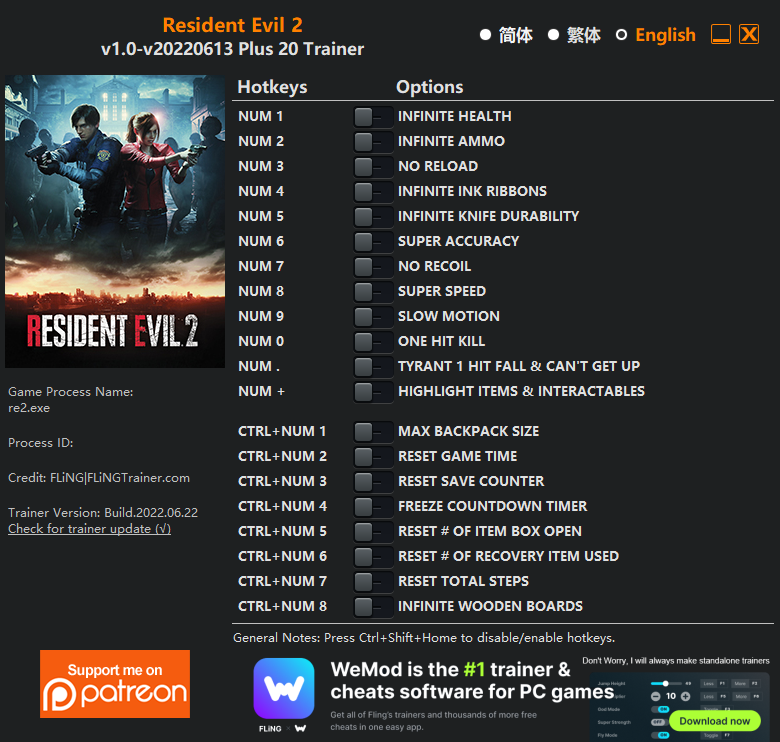
 Options
Num 1 – Infinite Health
Num 2 – Infinite Ammo
Num 3 – No Reload
Num 4 – Infinite Ink Ribbons
Num 5 – Infinite Knife Durability
Num 6 – Super Accuracy
Num 7 – No Recoil
Num 8 – Super Speed
Num 9 – Slow Motion
Num 0 – One Hit Kill
Num . – Tyrant 1 Hit Fall & Can’t Get Up
Num + – Highlight Items & Interactables
Ctrl+Num 1 – Max Backpack Size
Ctrl+Num 2 – Reset Game Time
Ctrl+Num 3 – Reset Save Counter
Ctrl+Num 4 – Freeze Countdown Timer
Ctrl+Num 5 – Reset # Of Item Box Open
Ctrl+Num 6 – Reset # Of Recovery Item Used
Ctrl+Num 7 – Reset Total Steps
Ctrl+Num 8 – Infinite Wooden Boards
Notes
- “Infinite Ammo”: You must have spare ammo in your inventory for it to work.
- “Infinite Ink Ribbons”: You must have ink ribbons in your inventory for it to work.
- “Infinite Wooden Boards”: You must have wooden boards in your inventory for it to work.
- “Infinite Knife Durability”: Takes effect when you use knife.
- “Reset Save Counter”: Takes effect when you save.
- “Reset Total Steps”: Takes effect when you walk.
- “Reset Game Time”: When activated, game time won’t exceed 60 seconds.
Download
| File | Date added | File size | Downloads |
|---|---|---|---|
 Resident.Evil.2.v1.0-v20220613.Plus.20.Trainer-FLiNG
|
2022-06-22 01:38 | 822 KB | 779771 |














can u add set player movement speed ?
for a coffee ?
I can’t get this to work, won’t detect game even though it’s on. please help??
Use proton 7-50
Got it to show up on my steam deck but cannot activate the cheats by clicking on them just like on Clair obscure, any thoughts?
please add god mode invencible
hello, the current version does not work on the latest game version
Use proton 7-50
What is the proton 7-50?Can u give a link?
On steam deck desktop look up the app protonup-qt just look for it in there
please updtae the trainer thx
can u please update this trainer, thx
Resident Evil 2 now also requires installing REF (REFramework), just like Resident Evil 4. After installation, the trainer can continue to be used.
REF download link: https://github.com/praydog/REFramework-nightly/releases
GOT IT TO WORK!!!!! On Steam Deck the Num Pad does not work on game mode, and even had a hard time to get it to work on Desktop mode, but now on Desktop Mode you can just CLICK in the settings and it will work!!