
33 Options · Game Version: v1.0-v1.0.16+ · Last Updated: 2021.04.10
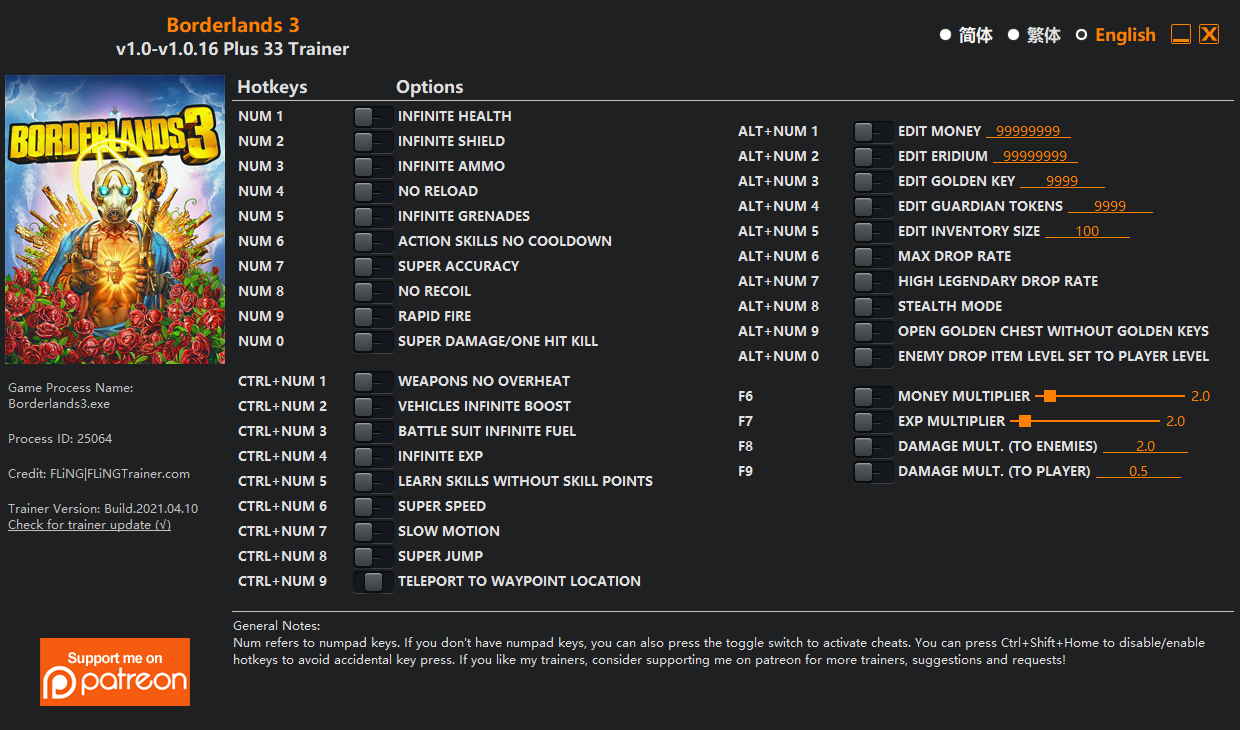
Options
Num 1 – Infinite Health
Num 2 – Infinite Shield
Num 3 – Infinite Ammo
Num 4 – No Reload
Num 5 – Infinite Grenades
Num 6 – Action Skills No Cooldown
Num 7 – Super Accuracy
Num 8 – No Recoil
Num 9 – Rapid Fire
Num 0 – Super Damage/One Hit Kill
Ctrl+Num 1 – Weapons No Overheat
Ctrl+Num 2 – Vehicles Infinite Boost
Ctrl+Num 3 – Battle Suit Infinite Fuel
Ctrl+Num 4 – Infinite Exp
Ctrl+Num 5 – Learn Skills Without Skill Points
Ctrl+Num 6 – Super Speed
Ctrl+Num 7 – Slow Motion
Ctrl+Num 8 – Super Jump
Ctrl+Num 9 – Teleport To Waypoint Location
Alt+Num 1 – Edit Money
Alt+Num 2 – Edit Eridium
Alt+Num 3 – Edit Golden Key
Alt+Num 4 – Edit Guardian Tokens
Alt+Num 5 – Edit Inventory Size
Alt+Num 6 – Max Drop Rate
Alt+Num 7 – High Legendary Drop Rate
Alt+Num 8 – Stealth Mode
Alt+Num 9 – Open Golden Chest Without Golden Keys
Alt+Num 0 – Enemy Drop Item Level Set To Player Level
F6 – Money Multiplier
F7 – Exp Multiplier
F8 – Damage Multiplier (Player To Enemies)
F9 – Damage Multiplier (Enemies To Player)
Notes
- “Infinite Health” and “Infinite Shield” take effect when you take damage; “Infinite Ammo” will set your ammo to max (exact value depends on the weapons); “Infinite Grenades” takes effect when you use grenades.
- “Infinite Health” also works for your battle suit and vehicle.
- While driving vehicles, don’t activate “Super Damage/One Hit Kill”, as it will also one hit kills your vehicle. You can use damage multiplier if needed, but you would also need to use “Infinite Health” to keep your vehicle health full.
- “Infinite Exp” takes effect when you gain Exp; Also works on guardian exp.
- “Learn Skills Without Skill Points” will set your skill point to zero so you won’t see the annoying message that tells you to spend unused skill points.
- “Edit Money”, “Edit Eridium”, and “Edit Golden Key”: After activated, open inventory to see the values change.
- “Edit Eridium”: You need to obtain at least one Eridium for it to work.
- “Edit Golden Key”: You need to obtain at least one Golden Key for it to work. To get golden keys early in the game, use the shift code (enter it in Main/Pause menu-Social-Shift) ZFKJ3-TT3BB-JTBJT-T3JJT-JWX9H to receive 3 golden keys.
- “Edit Guardian Tokens”: Open guardian level screen to see the value changes. You may want to set it to 0 afterward to avoid the game keep telling you to spend remaining tokens.
- “Max Drop Rate”: While activated, every enemy will drop 7-10 items. Note: this option does not affect item rarity.
- “High Legendary Drop Rate”: While activated, each item dropped from enemies will have 10%-20% chance of being a legendary item.
Download
| File | Date added | File size | Downloads |
|---|---|---|---|
 Borderlands.3.v1.0-v1.0.16.Plus.33.Trainer-FLiNG
|
2021-04-10 22:55 | 811 KB | 439161 |
|
Borderlands.3.v1.0-v1.0.15.Plus.33.Trainer-FLiNG
|
2021-01-22 17:50 | 818 KB | 30655 |
|
Borderlands.3.v1.0-v1.0.14.Plus.33.Trainer-FLiNG
|
2021-01-21 03:04 | 818 KB | 22983 |
|
Borderlands.3.v1.0-v1.0.10.Plus.31.Trainer-FLiNG
|
2020-06-28 03:24 | 809 KB | 54419 |
|
Borderlands.3.v1.0-v1.0.8.Plus.31.Trainer-FLiNG
|
2020-04-26 08:17 | 808 KB | 69488 |
 Borderlands.3.v1.0-v1.0.7.Plus.31.Trainer-FLiNG
|
2020-03-26 16:59 | 704 KB | 37622 |
|
Borderlands.3.v1.0-v1.0.6.Plus.31.Trainer.Updated-FLiNG
|
2020-03-13 19:49 | 686 KB | 27003 |
|
Borderlands.3.v1.0-v1.0.6.Plus.31.Trainer-FLiNG
|
2020-02-14 06:14 | 685 KB | 16951 |
|
Borderlands.3.v1.0-v1.0.5.Plus.31.Trainer-FLiNG
|
2019-12-12 19:44 | 684 KB | 33179 |
|
Borderlands.3.v1.0-v1.0.4.Plus.31.Trainer-FLiNG
|
2019-11-21 18:21 | 685 KB | 29356 |
|
Borderlands.3.v1.0-v1.0.3.Plus.31.Trainer-FLiNG
|
2019-11-01 15:01 | 683 KB | 48965 |
















Hey FLiNG, the newest patch to the game has made enough shifts in the code that the trainer gets an error message when trying to engage options. I’m sure you are already aware, but I’d be super appreciative if you dropped an update when you have time. Thx again for an awesome trainer mate.
—————————
Error Message
—————————
Address not found, please try to restart the game & trainer.
If this error still occur, please contact me at FLiNGTrainer.com or at 3DMGAME.
Be sure to include the following data (Press Ctrl+C to copy).
Process ID: 00000260
Search Range: 0000000140000000 – 0000000164E43000
Bytes Searched: 590.27 MB
Signature: F3 0F 10 88 ** ** 00 00 84 ** 74 ** 80 FB 02 76 ** 80 FB 03 74
Trainer Version: Borderlands 3 v1.0-v1.0.7 Plus 31 Trainer
—————————
OK
—————————
Sorry, forgot to include this.
Some parts of the trainer broke due to the new cartel and mayhem 2.0 update
Version 1.0.7 worked perfectly, fantastic program, after Steam updates will be needed version 1.0.8.
1.0.7 not working
need to update the trainer xD
UPDATE! NEW PATCH 23.04.2020
Hey Fling, thanks for your hard work, BL3 needs a new update for 04/23
Hopefully the linkage in the trainer between backpack and bank size can be fixed so we can use the new bank size limit (or at least increase the backpack limit to 300).
is there gonna be a new update released for the mayhem 2.0?
Hello, I can activate certain functions in the Trainer
—————————
Error Message
—————————
Address not found, please try to restart the game & trainer.
If this error still occur, please contact me at FLiNGTrainer.com or at 3DMGAME.
Be sure to include the following data (Press Ctrl+C to copy).
Process ID: 000011EC
Search Range: 0000000140000000 – 0000000163951000
Bytes Searched: 569.33 MB
Signature: 0F 28 F9 48 89 CE 48 85 ** 75 ** E8 ** ** ** ** 48 ** ** 48 85 C0 0F 84
Trainer Version: Borderlands 3 v1.0-v1.0.7 Plus 31 Trainer
—————————
OK
—————————
I cant*
sorry for my misspelling
since today gearbox make new change in BL3….i guess admin still make no update to this trainer yet….lets just wait
I received this message when selecting Infinite Health and Infinite Shield, along with some other selections. Some selections did work, however. This started happening to me today (04/23/20) and did work yesterday, 04/22/20. I noticed an update to Epic frontend software today, so maybe it has something to do with that.
—————————
Error Message
—————————
Address not found, please try to restart the game & trainer.
If this error still occur, please contact me at FLiNGTrainer.com or at 3DMGAME.
Be sure to include the following data (Press Ctrl+C to copy).
Process ID: 00002D0C
Search Range: 0000000140000000 – 0000000163951000
Bytes Searched: 569.33 MB
Signature: F3 0F 10 88 ** ** 00 00 84 ** 74 ** 80 FB 02 76 ** 80 FB 03 74
Trainer Version: Borderlands 3 v1.0-v1.0.6 Plus 31 Trainer
—————————
OK
—————————
—————————
Error Message
—————————
Address not found, please try to restart the game & trainer.
If this error still occur, please contact me at FLiNGTrainer.com or at 3DMGAME.
Be sure to include the following data (Press Ctrl+C to copy).
Process ID: 00000900
Search Range: 0000000140000000 – 0000000164E43000
Bytes Searched: 590.27 MB
Signature: F3 0F 10 88 ** ** 00 00 84 ** 74 ** 80 FB 02 76 ** 80 FB 03 74
Trainer Version: Borderlands 3 v1.0-v1.0.7 Plus 31 Trainer
—————————
OK
—————————
i closed the game and the trainer then restarted 3 time,
im on the menu and tried it in single player,
normally works 100% and super happy with it and will recommend,
understandable when the game updates there may be conflict in code. 🙂
All these comments about “Address not found” errors…
Guys, the game had a severe update today, and that’s why the trainer doesn’t work anymore. It just needs an update is all.
ok thank you for comforting my guess,
i thought it may be that.
—————————
Error Message
—————————
Address not found, please try to restart the game & trainer.
If this error still occur, please contact me at FLiNGTrainer.com or at 3DMGAME.
Be sure to include the following data (Press Ctrl+C to copy).
Process ID: 00000C88
Search Range: 0000000140000000 – 0000000163951000
Bytes Searched: 569.33 MB
Signature: F3 0F 10 88 ** ** 00 00 84 ** 74 ** 80 FB 02 76 ** 80 FB 03 74
Trainer Version: Borderlands 3 v1.0-v1.0.7 Plus 31 Trainer
—————————
OK
—————————