
Note: Offline mode only.
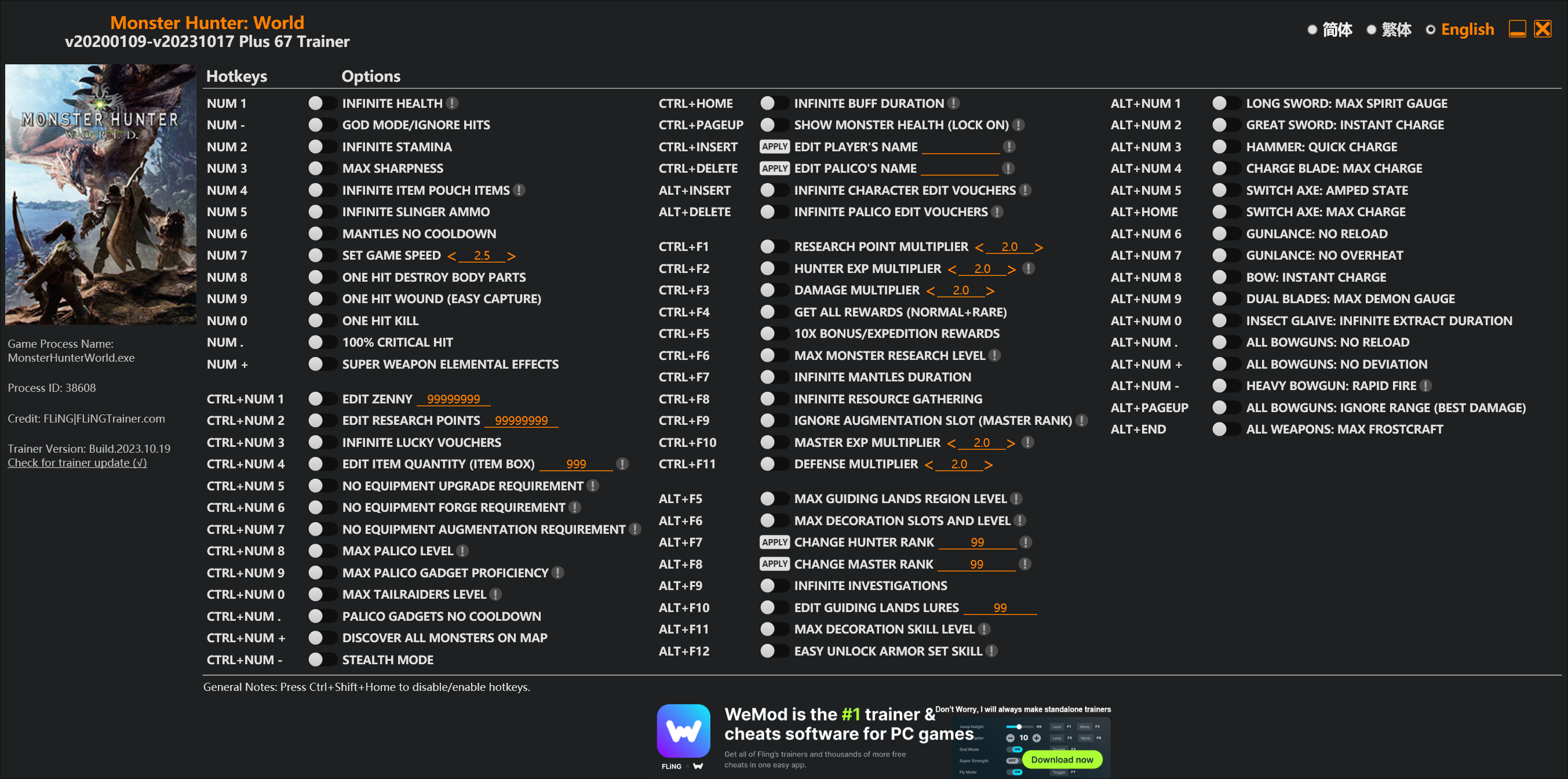
Options
Num 1 – Infinite Health 
Num – – God Mode/Ignore Hits
Num 2 – Infinite Stamina
Num 3 – Max Sharpness
Num 4 – Infinite Item Pouch Items
Num 5 – Infinite Slinger Ammo
Num 6 – Mantles No Cooldown
Num 7 – Set Game Speed
Num 8 – One Hit Destroy Body Parts
Num 9 – One Hit Wound (Easy Capture)
Num 0 – One Hit Kill
Num . – 100% Critical Hit
Num + – Super Weapon Elemental Effects
Ctrl+Num 1 – Edit Zenny
Ctrl+Num 2 – Edit Research Points
Ctrl+Num 3 – Infinite Lucky Vouchers
Ctrl+Num 4 – Edit Item Quantity (Item Box)
Ctrl+Num 5 – No Equipment Upgrade Requirement
Ctrl+Num 6 – No Equipment Forge Requirement
Ctrl+Num 7 – No Equipment Augmentation Requirement
Ctrl+Num 8 – Max Palico Level
Ctrl+Num 9 – Max Palico Gadget Proficiency
Ctrl+Num 0 – Max Tailraiders Level
Ctrl+Num . – Palico Gadgets No Cooldown
Ctrl+Num + – Discover All Monsters On Map
Ctrl+Num – – Stealth Mode
Ctrl+Home – Infinite Buff Duration
Ctrl+PageUp – Show Monster Health (Lock On)
Ctrl+Insert – Edit Player’s Name
Ctrl+Delete – Edit Palico’s Name
Alt+Insert – Infinite Character Edit Vouchers
Alt+Delete – Infinite Palico Edit Vouchers
Ctrl+F1 – Research Point Multiplier
Ctrl+F2 – Hunter Exp Multiplier
Ctrl+F3 – Damage Multiplier
Ctrl+F4 – Get All Rewards (Normal+Rare)
Ctrl+F5 – 10x Bonus/Expedition Rewards
Ctrl+F6 – Max Monster Research Level
Ctrl+F7 – Infinite Mantles Duration
Ctrl+F8 – Infinite Resource Gathering
Ctrl+F9 – Ignore Augmentation Slot (Master Rank)
Ctrl+F10 – Master Exp Multiplier
Ctrl+F11 – Defense Multiplier
Alt+F5 – Max Guiding Lands Region Level
Alt+F6 – Max Decoration Slots And Level
Alt+F7 – Change Hunter Rank
Alt+F8 – Change Master Rank
Alt+F9 – Infinite Investigations
Alt+F10 – Edit Guiding Lands Lures
Alt+F11 – Max Decoration Skill Level
Alt+F12 – Easy Unlock Armor Set Skill
Alt+Num 1 – Long Sword: Max Spirit Gauge
Alt+Num 2 – Great Sword: Instant Charge
Alt+Num 3 – Hammer: Quick Charge
Alt+Num 4 – Charge Blade: Max Charge
Alt+Num 5 – Switch Axe: Amped State
Alt+Home – Switch Axe: Max Charge
Alt+Num 6 – Gunlance: No Reload
Alt+Num 7 – Gunlance: No Overheat
Alt+Num 8 – Bow: Instant Charge
Alt+Num 9 – Dual Blades: Max Demon Gauge
Alt+Num 0 – Insect Glaive: Infinite Extract Duration
Alt+Num . – All Bowguns: No Reload
Alt+Num + – All Bowguns: No Deviation
Alt+Num – – Heavy Bowgun: Rapid Fire
Alt+PageUp – All Bowguns: Ignore Range (Best Damage)
Alt+End – All Weapons: Max Frostcraft
Special Notes
If you installed “Stracker’s Loader” and “Performance Booster and Plugin Extender” or other mods, make sure to update them to the latest version or delete them if you don’t use mods, otherwiese the game may crash during startup.
Download
| File | Date added | File size | Downloads |
|---|---|---|---|
 Monster.Hunter.World.v20200109-v20231017.Plus.67.Trainer-FLiNG
|
2023-10-19 10:55 | 926 KB | 1445396 |
|
Monster.Hunter.World.v20200109-v20210602.Plus.67.Trainer-FLiNG
|
2021-06-04 20:24 | 1.33 MB | 497463 |
|
Monster.Hunter.World.v20200109-v20201001.Plus.67.Trainer-FLiNG
|
2020-10-02 08:25 | 1.95 MB | 652622 |
|
Monster.Hunter.World.v20200109-v20201001.Plus.14.Trainer-FLiNG
|
2020-10-01 16:39 | 1.04 MB | 182926 |
















can i get banned for changing my hunter rank from 823 to 181 ? that was my PS4 rank.
I want more traditional functions than you. Can you help us?
Please can you make a trainer for one piece world seeker cause the old ones don’t seem to work.
where is 1002.ver download?;;
希望更新之前那种好多选项的
thank u so much, im your fan, always search for your trainer first when i need to make game easier. u are my life saver
Hunting Simulator 2
新版的需要下载mod看不懂实在是不会用
好像把nativepc和那三个文件都放在游戏主文件exe所在目录下就行了
我看不懂英文 下载都找不到 还是等大佬完善一下吧23333
請問MOD下載好了,如何安裝呢?
MOD文件复制到游戏目录中即可
不好意思風大
我複製到目錄下結果重啟遊戲 立即跳出 是否不能使用聯機?
装了MOD跳出可能需要安装vc++运行库,Stracker’s Loader里有提到这个问题,运行库下载地址:https://support.microsoft.com/zh-cn/help/2977003/the-latest-supported-visual-c-downloads
對不起風大 請讓我叫你風神
已經可以用了 真是牛!真是神!謝謝風神
SPECIAL NOTES
This trainer requires MOD “Performance Booster and Plugin Extender” to bypass crc memory check/anti tamper in the game, please follow these steps:
1. Install “Stracker’s Loader” (required for Performance Booster and Plugin Extender) from:
https://www.nexusmods.com/monsterhunterworld/mods/1982
2. Install “Performance Booster and Plugin Extender” mod from:
https://www.nexusmods.com/monsterhunterworld/mods/3473
3. Restart the game and trainer.
may i know how to install?i had download both and one fo them with “native PC” folder and another with 3 file. i juz put them in game folder or what? tq.
Yes, just put them in game folder.
我把“native pc”整个文件夹和1982里的三个文件(两个dll和一个json直接复制黏贴到common\Monster Hunter World里,但是启动游戏后那个类似dos的界面提示载入native pc里的那个pass文件失败。然后游戏载入中就跳出了。请问怎么解决~谢谢
jus place the both should work finne,if not delete native pc, then replace the “Performance Booster and Plugin Extender again. done
看到你给其他人的回答了,原来是vc++的问题,谢谢。
SPECIAL NOTES
This trainer requires MOD “Performance Booster and Plugin Extender” to bypass crc memory check/anti tamper in the game, please follow these steps:
1. Install “Stracker’s Loader” (required for Performance Booster and Plugin Extender) from:
https://www.nexusmods.com/monsterhunterworld/mods/1982
2. Install “Performance Booster and Plugin Extender” mod from:
https://www.nexusmods.com/monsterhunterworld/mods/3473
3. Restart the game and trainer.
may i know how to install?i had download both and one fo them with “native PC” folder and another with 3 file. i juz put them in game folder or what?
I did it in order, is that why I can’t?
中国人表示下载不明白MOD
halelujah
FLING I LUV U
谁可以发个文件么,确实不懂怎么安装哦