
Note: Offline mode only.
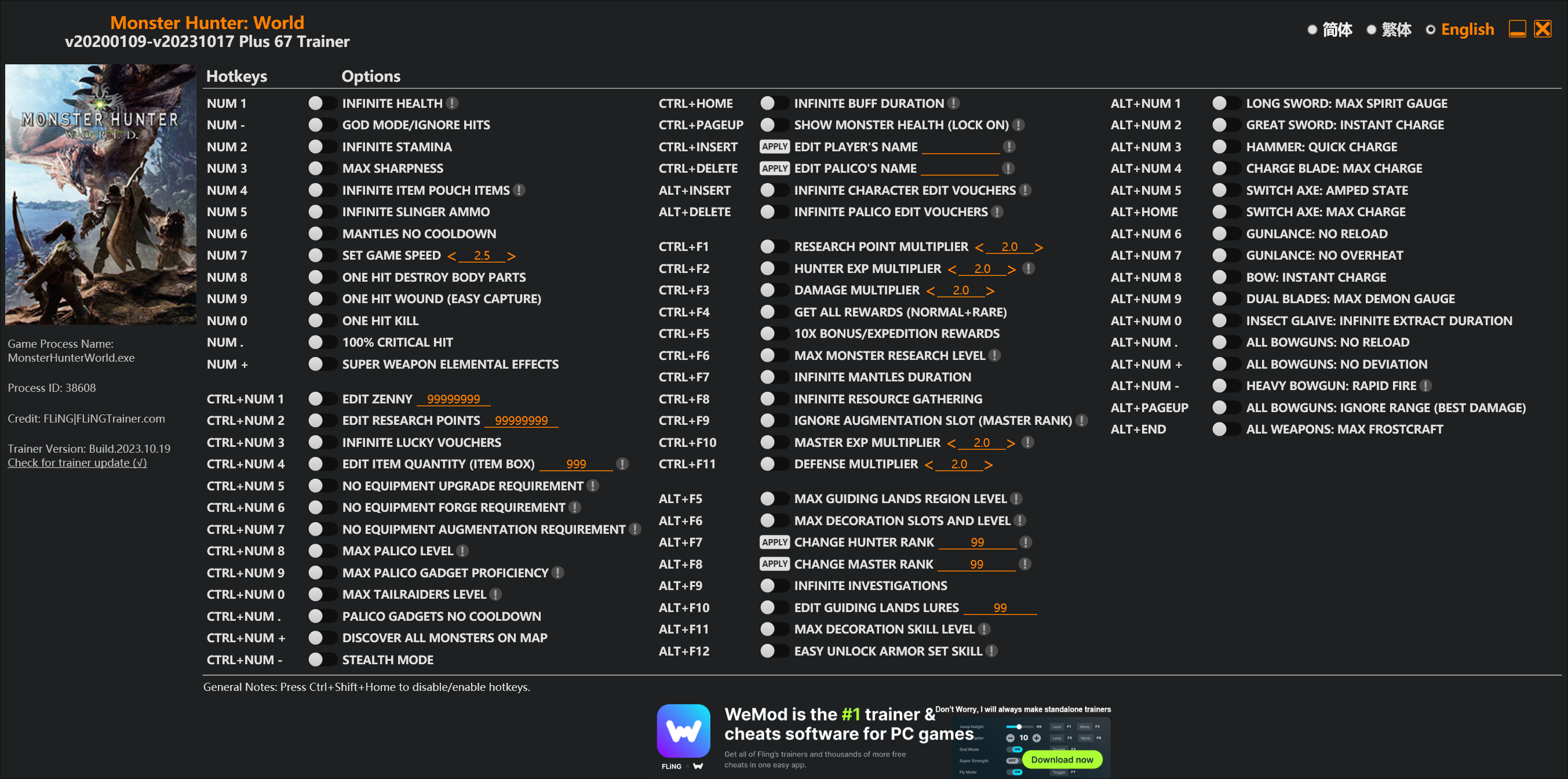
Options
Num 1 – Infinite Health 
Num – – God Mode/Ignore Hits
Num 2 – Infinite Stamina
Num 3 – Max Sharpness
Num 4 – Infinite Item Pouch Items
Num 5 – Infinite Slinger Ammo
Num 6 – Mantles No Cooldown
Num 7 – Set Game Speed
Num 8 – One Hit Destroy Body Parts
Num 9 – One Hit Wound (Easy Capture)
Num 0 – One Hit Kill
Num . – 100% Critical Hit
Num + – Super Weapon Elemental Effects
Ctrl+Num 1 – Edit Zenny
Ctrl+Num 2 – Edit Research Points
Ctrl+Num 3 – Infinite Lucky Vouchers
Ctrl+Num 4 – Edit Item Quantity (Item Box)
Ctrl+Num 5 – No Equipment Upgrade Requirement
Ctrl+Num 6 – No Equipment Forge Requirement
Ctrl+Num 7 – No Equipment Augmentation Requirement
Ctrl+Num 8 – Max Palico Level
Ctrl+Num 9 – Max Palico Gadget Proficiency
Ctrl+Num 0 – Max Tailraiders Level
Ctrl+Num . – Palico Gadgets No Cooldown
Ctrl+Num + – Discover All Monsters On Map
Ctrl+Num – – Stealth Mode
Ctrl+Home – Infinite Buff Duration
Ctrl+PageUp – Show Monster Health (Lock On)
Ctrl+Insert – Edit Player’s Name
Ctrl+Delete – Edit Palico’s Name
Alt+Insert – Infinite Character Edit Vouchers
Alt+Delete – Infinite Palico Edit Vouchers
Ctrl+F1 – Research Point Multiplier
Ctrl+F2 – Hunter Exp Multiplier
Ctrl+F3 – Damage Multiplier
Ctrl+F4 – Get All Rewards (Normal+Rare)
Ctrl+F5 – 10x Bonus/Expedition Rewards
Ctrl+F6 – Max Monster Research Level
Ctrl+F7 – Infinite Mantles Duration
Ctrl+F8 – Infinite Resource Gathering
Ctrl+F9 – Ignore Augmentation Slot (Master Rank)
Ctrl+F10 – Master Exp Multiplier
Ctrl+F11 – Defense Multiplier
Alt+F5 – Max Guiding Lands Region Level
Alt+F6 – Max Decoration Slots And Level
Alt+F7 – Change Hunter Rank
Alt+F8 – Change Master Rank
Alt+F9 – Infinite Investigations
Alt+F10 – Edit Guiding Lands Lures
Alt+F11 – Max Decoration Skill Level
Alt+F12 – Easy Unlock Armor Set Skill
Alt+Num 1 – Long Sword: Max Spirit Gauge
Alt+Num 2 – Great Sword: Instant Charge
Alt+Num 3 – Hammer: Quick Charge
Alt+Num 4 – Charge Blade: Max Charge
Alt+Num 5 – Switch Axe: Amped State
Alt+Home – Switch Axe: Max Charge
Alt+Num 6 – Gunlance: No Reload
Alt+Num 7 – Gunlance: No Overheat
Alt+Num 8 – Bow: Instant Charge
Alt+Num 9 – Dual Blades: Max Demon Gauge
Alt+Num 0 – Insect Glaive: Infinite Extract Duration
Alt+Num . – All Bowguns: No Reload
Alt+Num + – All Bowguns: No Deviation
Alt+Num – – Heavy Bowgun: Rapid Fire
Alt+PageUp – All Bowguns: Ignore Range (Best Damage)
Alt+End – All Weapons: Max Frostcraft
Special Notes
If you installed “Stracker’s Loader” and “Performance Booster and Plugin Extender” or other mods, make sure to update them to the latest version or delete them if you don’t use mods, otherwiese the game may crash during startup.
Download
| File | Date added | File size | Downloads |
|---|---|---|---|
 Monster.Hunter.World.v20200109-v20231017.Plus.67.Trainer-FLiNG
|
2023-10-19 10:55 | 926 KB | 1440414 |
|
Monster.Hunter.World.v20200109-v20210602.Plus.67.Trainer-FLiNG
|
2021-06-04 20:24 | 1.33 MB | 497341 |
|
Monster.Hunter.World.v20200109-v20201001.Plus.67.Trainer-FLiNG
|
2020-10-02 08:25 | 1.95 MB | 652548 |
|
Monster.Hunter.World.v20200109-v20201001.Plus.14.Trainer-FLiNG
|
2020-10-01 16:39 | 1.04 MB | 182886 |














6月3号更新后会打开一些功能会闪退
New update 15.11.01 just came out today and Trainer got crash again
Fling please update it , Thanks yoh
Starting to wonder if the creator just abandoned the app. I swear Capcom just updated to force this out of the game.
Please update soon
You don’t need a trainer update, you need to wait for Stracker’s Loader update or use a temporary fix as Daniil said (make a copy of dtdata.dll and rename the copy to hid.dll). The trainer is working fine with this temporary fix, and will also work when Stracker’s Loader updated for the latest game version.
Supposedly, the last update has been released.
They finally removed Denuvo.
Curious to see if they removed anything else.
I’m also curious if Monster Hunter Rise will use Denuvo.
Probably yes.
Fling, please update your trainer to the last update.
Thank you for all your work.. one of the best of the world.
风大,6月份开始用就秒退游戏了,装了最新的Stracker都没用
6月份卡普空更新了一次,不仅修改器用不了,而且Hunterpie也用不了,我猜测是一旦有人动内存,就会直接强退游戏
hunterpie可以正常运行啊,我一直在用 ,把nativePc删掉就行了
nativePc是干嘛的,删掉没问题吗
不知道是要等修改器作者更新,还是要等那些反作弊文件更新
hunterpie可以用啊
PLZ update thk you
Any chance for an update good sir? I’ve grown so use to playing with your trainer that the game is just unenjoyable without.
All works without crashing if you duplicate this file and one of them rename from dtdata.dll to hid.dll(https://imgur.com/8y0cdc9 ignore this console window https://imgur.com/riC7MDI
how do i do that? i mean do i just copy paste these files again or something else?
you need copy paste dtdata and rename copied dtdata to hid
https://imgur.com/dkdkpT3
Can this get an update? As it was patched out as of yesterday, thanks baby gimme that pussy boss.
All works without crashing if you duplicate this file and one of them rename from dtdata.dll to hid.dll(https://imgur.com/8y0cdc9 ignore this console window https://imgur.com/riC7MDI
The most recent update stopped the trainer from working 🙁
Any chance of an update sometime soon?
All works without crashing if you duplicate this file and one of them rename from dtdata.dll to hid.dll(https://imgur.com/8y0cdc9 ignore this console window https://imgur.com/riC7MDI
All works without crashing if you duplicate this file and one of them rename from dtdata.dll to hid.dll(https://imgur.com/8y0cdc9 ignore this console window https://imgur.com/riC7MDI
If you duplicate this file and rename one of them from dtdata.dll to hid.dll (https://imgur.com/8y0cdc9 Ignore this console window https://imgur.com/riC7MDI) Everything works without crashing.
↑↑
I did this, but with the StrackerLoader failing, the mod I’m installing separately doesn’t work.
Please tell me what to do; (
Also, please update Trainer for this.
Thank you very much
just ignore stacker failing, but dont close the error window
Ignore this console window https://imgur.com/riC7MDI
How do you ignore it?
lol, don’t close it and play the game
After the error message appears, it does not proceed from that screen.
I’m sorry. I don’t know much about computers.
it works for me thanks a lot
Some of the trainer mods don’t work, such as “max decoration skill level”
最新MHW冰原更新了之后,开trainer的一击必杀之后,游戏进行大约不到5分钟就会闪退。望改进一下,谢谢。
15.11.01更新后,修改器临时使用的一个小经验,复制dtdata.dll文件,并把这个文件重新命名为hid.dll,就可以使用了。
这个文件在哪里啊老哥
so is there gonna be another update the game keeps crashing since the last game update
The game was updated this week.
Because DRM was removed, some options of the trainer crash the game.
Could you please update the trainer?
Thank you!
I saw the temporary fix… Ignore the request I said.
But I’d like to request to add an option to change the ingame hour (not the hours played in the savedata), so that you could change to dawn, midday, afternoon, sunset, evening, etc. Like it is available in Marcus table… Regards!
please update this to version 15.11.01