
Note: Offline mode only.
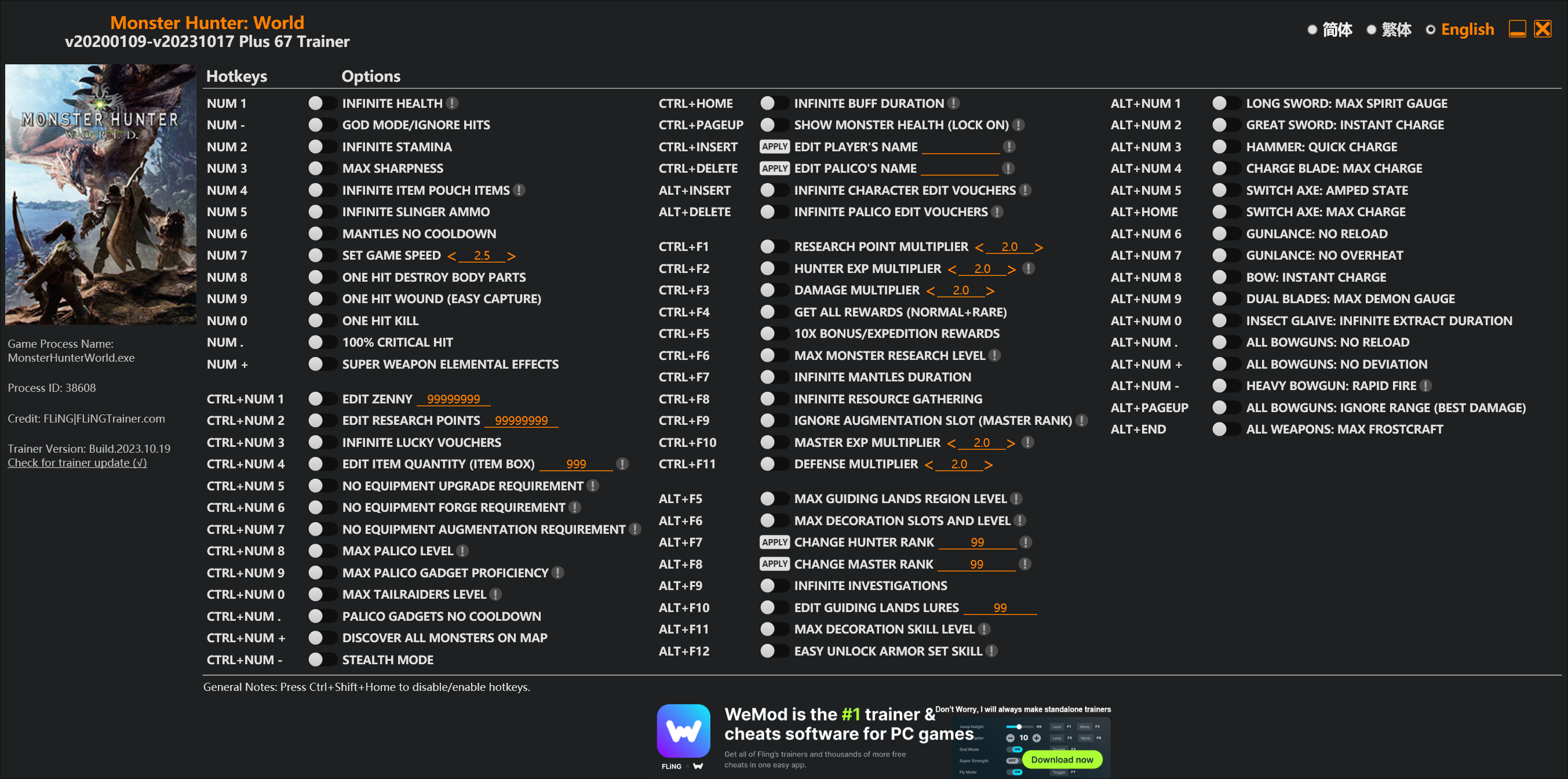
Options
Num 1 – Infinite Health 
Num – – God Mode/Ignore Hits
Num 2 – Infinite Stamina
Num 3 – Max Sharpness
Num 4 – Infinite Item Pouch Items
Num 5 – Infinite Slinger Ammo
Num 6 – Mantles No Cooldown
Num 7 – Set Game Speed
Num 8 – One Hit Destroy Body Parts
Num 9 – One Hit Wound (Easy Capture)
Num 0 – One Hit Kill
Num . – 100% Critical Hit
Num + – Super Weapon Elemental Effects
Ctrl+Num 1 – Edit Zenny
Ctrl+Num 2 – Edit Research Points
Ctrl+Num 3 – Infinite Lucky Vouchers
Ctrl+Num 4 – Edit Item Quantity (Item Box)
Ctrl+Num 5 – No Equipment Upgrade Requirement
Ctrl+Num 6 – No Equipment Forge Requirement
Ctrl+Num 7 – No Equipment Augmentation Requirement
Ctrl+Num 8 – Max Palico Level
Ctrl+Num 9 – Max Palico Gadget Proficiency
Ctrl+Num 0 – Max Tailraiders Level
Ctrl+Num . – Palico Gadgets No Cooldown
Ctrl+Num + – Discover All Monsters On Map
Ctrl+Num – – Stealth Mode
Ctrl+Home – Infinite Buff Duration
Ctrl+PageUp – Show Monster Health (Lock On)
Ctrl+Insert – Edit Player’s Name
Ctrl+Delete – Edit Palico’s Name
Alt+Insert – Infinite Character Edit Vouchers
Alt+Delete – Infinite Palico Edit Vouchers
Ctrl+F1 – Research Point Multiplier
Ctrl+F2 – Hunter Exp Multiplier
Ctrl+F3 – Damage Multiplier
Ctrl+F4 – Get All Rewards (Normal+Rare)
Ctrl+F5 – 10x Bonus/Expedition Rewards
Ctrl+F6 – Max Monster Research Level
Ctrl+F7 – Infinite Mantles Duration
Ctrl+F8 – Infinite Resource Gathering
Ctrl+F9 – Ignore Augmentation Slot (Master Rank)
Ctrl+F10 – Master Exp Multiplier
Ctrl+F11 – Defense Multiplier
Alt+F5 – Max Guiding Lands Region Level
Alt+F6 – Max Decoration Slots And Level
Alt+F7 – Change Hunter Rank
Alt+F8 – Change Master Rank
Alt+F9 – Infinite Investigations
Alt+F10 – Edit Guiding Lands Lures
Alt+F11 – Max Decoration Skill Level
Alt+F12 – Easy Unlock Armor Set Skill
Alt+Num 1 – Long Sword: Max Spirit Gauge
Alt+Num 2 – Great Sword: Instant Charge
Alt+Num 3 – Hammer: Quick Charge
Alt+Num 4 – Charge Blade: Max Charge
Alt+Num 5 – Switch Axe: Amped State
Alt+Home – Switch Axe: Max Charge
Alt+Num 6 – Gunlance: No Reload
Alt+Num 7 – Gunlance: No Overheat
Alt+Num 8 – Bow: Instant Charge
Alt+Num 9 – Dual Blades: Max Demon Gauge
Alt+Num 0 – Insect Glaive: Infinite Extract Duration
Alt+Num . – All Bowguns: No Reload
Alt+Num + – All Bowguns: No Deviation
Alt+Num – – Heavy Bowgun: Rapid Fire
Alt+PageUp – All Bowguns: Ignore Range (Best Damage)
Alt+End – All Weapons: Max Frostcraft
Special Notes
If you installed “Stracker’s Loader” and “Performance Booster and Plugin Extender” or other mods, make sure to update them to the latest version or delete them if you don’t use mods, otherwiese the game may crash during startup.
Download
| File | Date added | File size | Downloads |
|---|---|---|---|
 Monster.Hunter.World.v20200109-v20231017.Plus.67.Trainer-FLiNG
|
2023-10-19 10:55 | 926 KB | 1441016 |
|
Monster.Hunter.World.v20200109-v20210602.Plus.67.Trainer-FLiNG
|
2021-06-04 20:24 | 1.33 MB | 497355 |
|
Monster.Hunter.World.v20200109-v20201001.Plus.67.Trainer-FLiNG
|
2020-10-02 08:25 | 1.95 MB | 652556 |
|
Monster.Hunter.World.v20200109-v20201001.Plus.14.Trainer-FLiNG
|
2020-10-01 16:39 | 1.04 MB | 182894 |














DAMMMN! 56 Options :O
Amazing work! Probably the most you have done!!
风灵大大 那个仓库无限物品能不能用于单个物品999 而不是全部999
when i quit the game using trainer, game is still running in background. and the save file did not saved. so I’m holding the same monster for the third time. can you fix it?
今天网上传出冰原(相较于本体)更新了反作弊会造成CPU占用和卡顿,并给出了alt+enter窗口化点X选否再alt+enter返回窗口化以规避反作弊软件的方法。在之前使用风大修改器我都没有注意反作弊相关的问题,在看到这个消息后我尝试了一下各种修改姿势最后发现,不alt+enter风大的修改器除了一击必杀和一击捕获会被T掉线之外可以完美运行,但是一旦在开着修改器的同时alt+enter马上游戏就会崩溃,显示err11: invalid dxgi call,风大能否注意到这条评论并简单说明一下修改器与alt+enter窗口化的关系?我现在怀疑是我点选了显血的原因(毕竟显血需要无边框窗口),请问是这样么?
Possible to make “get all decorations” ?
Reply
Do you plan on adding a feature that changes crowns of monsters/endemic life?
请问大佬,能不能加一个把仓库里东西从999改回到1的功能?无限仓库物品点了之后,有个剧情给的珠子卖不掉……强迫症发了……
跪谢大佬
新版有BUG??开下去FPS狂掉到个位数。
Suggestion for addition (to help many other comments above with adding item to box)
Could you add a toggle option to add either 10/99 items of an item with specified item ID to the box?
https://mhw.poedb.tw/eng/rawitems
The list of items and RAW IDs have been de-coded already.
This way, the users can add either 10/99 of a single specific item, i.e. Jewel or armor sphere to their box if they do not have that item at all.
Toggle option could have 0/10/99, and an input for the item ID (Item ID:_______).
Just a suggestion…
Good idea!!
Yes yes please do something like this!!
Oh wow this is a great idea!! This would be really useful, I’m dying just to get decent level 4 decorations…
I would really like this! This would be perfect to get those King armor spheres for full upgrades!
OMG yes please do add this! For the decorations and armor spheres!!
Also really useful for getting Dust of Life and those other items you can use on team mates when you transit to online play!
This would be such a useful addition to have!! Thumbs up!👍🏼
Wow this would be a great addition to have in the next update! Hope it would be added!
今天开下去,FPS狂掉到个位数..
Whenever I finished the main story, after the credits rolled, I got stuck on a black screen for 5 minutes and had to close out of the game.
what next ?
if it’s after Shara, just relaunch the game should start you off back in two, if it’s Xeno your gonna have to launch the game WITHOUT the trainer open, watch the credits COMPLETELY, then when you see the loading screen you can launch the trainer and go back to whatever you where doing with it.
in down
TOWN!, i can’t english AT ALL!
you are the best! thanks
For some reason every time I activate the “Show Monster Health” option, the game soft crashes and I have to restart it.
Read the notes about that option and DX11/DX12 that its probably your issue
Huh.. completely missed that apparently. I would switch to DX11, but I have way more problems at the moment so I guess I’ll stick to not using that option for now. Thanks for the info.
I’m still getting the crash after using it but it’s not immediate anymore. It seems to happen at the rewards screen after a hunt. Would having the SpecialK graphics menu installed possibly cause the problem? I have the game in borderless and dx11 so I can’t think of what else it could be.
Your trainer is becoming godly and what you are doing is amazing, thank you sharing this.
Is it possible to make an option for the steamworks? I’m sure a mod will come around eventually so more of a curiosity than a request 😛
Hope you add infinite bowgun custom mods, thank you!