
Note: Offline mode only.
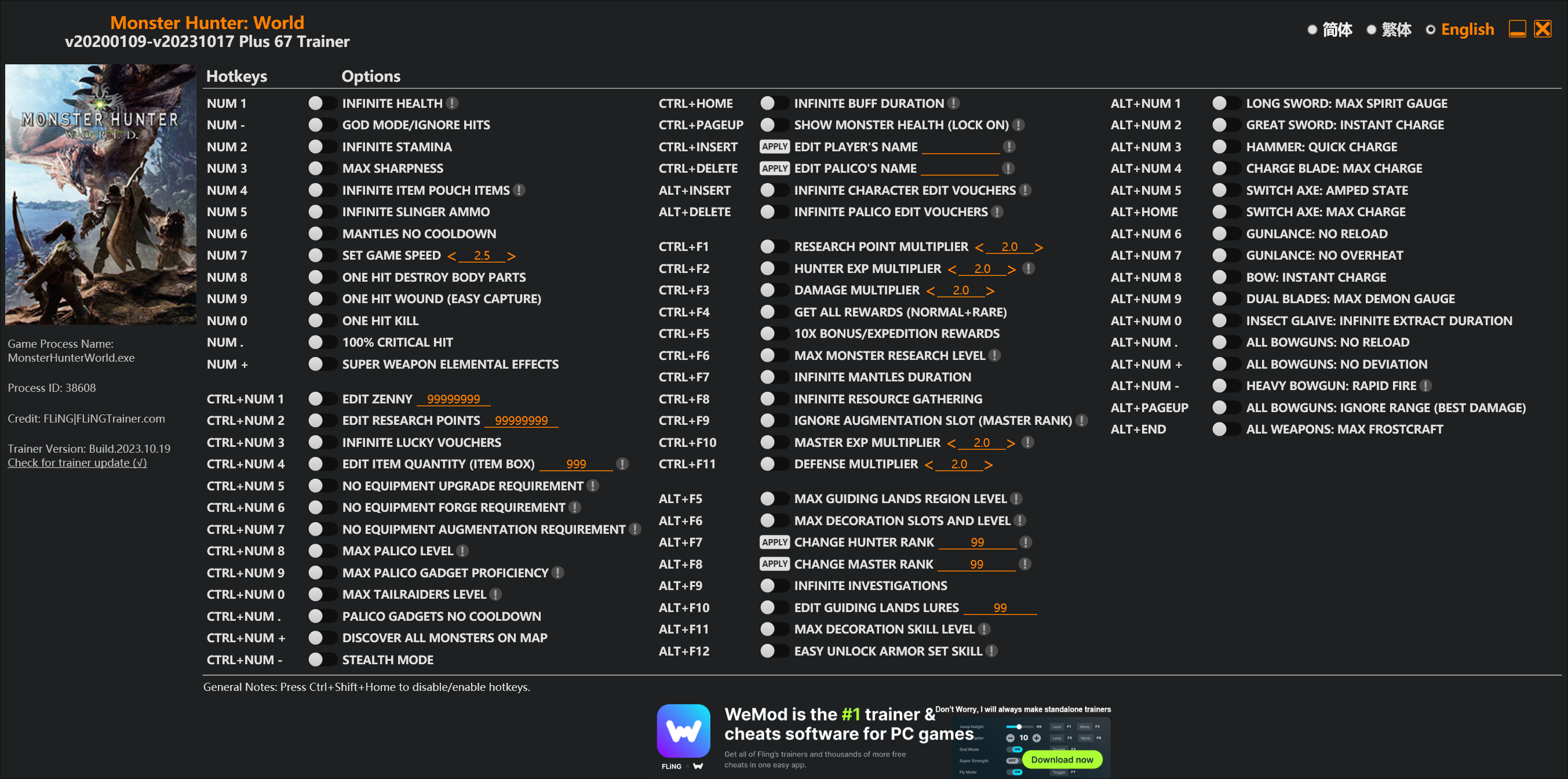
Options
Num 1 – Infinite Health 
Num – – God Mode/Ignore Hits
Num 2 – Infinite Stamina
Num 3 – Max Sharpness
Num 4 – Infinite Item Pouch Items
Num 5 – Infinite Slinger Ammo
Num 6 – Mantles No Cooldown
Num 7 – Set Game Speed
Num 8 – One Hit Destroy Body Parts
Num 9 – One Hit Wound (Easy Capture)
Num 0 – One Hit Kill
Num . – 100% Critical Hit
Num + – Super Weapon Elemental Effects
Ctrl+Num 1 – Edit Zenny
Ctrl+Num 2 – Edit Research Points
Ctrl+Num 3 – Infinite Lucky Vouchers
Ctrl+Num 4 – Edit Item Quantity (Item Box)
Ctrl+Num 5 – No Equipment Upgrade Requirement
Ctrl+Num 6 – No Equipment Forge Requirement
Ctrl+Num 7 – No Equipment Augmentation Requirement
Ctrl+Num 8 – Max Palico Level
Ctrl+Num 9 – Max Palico Gadget Proficiency
Ctrl+Num 0 – Max Tailraiders Level
Ctrl+Num . – Palico Gadgets No Cooldown
Ctrl+Num + – Discover All Monsters On Map
Ctrl+Num – – Stealth Mode
Ctrl+Home – Infinite Buff Duration
Ctrl+PageUp – Show Monster Health (Lock On)
Ctrl+Insert – Edit Player’s Name
Ctrl+Delete – Edit Palico’s Name
Alt+Insert – Infinite Character Edit Vouchers
Alt+Delete – Infinite Palico Edit Vouchers
Ctrl+F1 – Research Point Multiplier
Ctrl+F2 – Hunter Exp Multiplier
Ctrl+F3 – Damage Multiplier
Ctrl+F4 – Get All Rewards (Normal+Rare)
Ctrl+F5 – 10x Bonus/Expedition Rewards
Ctrl+F6 – Max Monster Research Level
Ctrl+F7 – Infinite Mantles Duration
Ctrl+F8 – Infinite Resource Gathering
Ctrl+F9 – Ignore Augmentation Slot (Master Rank)
Ctrl+F10 – Master Exp Multiplier
Ctrl+F11 – Defense Multiplier
Alt+F5 – Max Guiding Lands Region Level
Alt+F6 – Max Decoration Slots And Level
Alt+F7 – Change Hunter Rank
Alt+F8 – Change Master Rank
Alt+F9 – Infinite Investigations
Alt+F10 – Edit Guiding Lands Lures
Alt+F11 – Max Decoration Skill Level
Alt+F12 – Easy Unlock Armor Set Skill
Alt+Num 1 – Long Sword: Max Spirit Gauge
Alt+Num 2 – Great Sword: Instant Charge
Alt+Num 3 – Hammer: Quick Charge
Alt+Num 4 – Charge Blade: Max Charge
Alt+Num 5 – Switch Axe: Amped State
Alt+Home – Switch Axe: Max Charge
Alt+Num 6 – Gunlance: No Reload
Alt+Num 7 – Gunlance: No Overheat
Alt+Num 8 – Bow: Instant Charge
Alt+Num 9 – Dual Blades: Max Demon Gauge
Alt+Num 0 – Insect Glaive: Infinite Extract Duration
Alt+Num . – All Bowguns: No Reload
Alt+Num + – All Bowguns: No Deviation
Alt+Num – – Heavy Bowgun: Rapid Fire
Alt+PageUp – All Bowguns: Ignore Range (Best Damage)
Alt+End – All Weapons: Max Frostcraft
Special Notes
If you installed “Stracker’s Loader” and “Performance Booster and Plugin Extender” or other mods, make sure to update them to the latest version or delete them if you don’t use mods, otherwiese the game may crash during startup.
Download
| File | Date added | File size | Downloads |
|---|---|---|---|
 Monster.Hunter.World.v20200109-v20231017.Plus.67.Trainer-FLiNG
|
2023-10-19 10:55 | 926 KB | 1446520 |
|
Monster.Hunter.World.v20200109-v20210602.Plus.67.Trainer-FLiNG
|
2021-06-04 20:24 | 1.33 MB | 497483 |
|
Monster.Hunter.World.v20200109-v20201001.Plus.67.Trainer-FLiNG
|
2020-10-02 08:25 | 1.95 MB | 652627 |
|
Monster.Hunter.World.v20200109-v20201001.Plus.14.Trainer-FLiNG
|
2020-10-01 16:39 | 1.04 MB | 182933 |














There is NO update needed, as I can tell. The latest Trainer-Versionfrom 2020-06-10 is still and completely working – at least, for me it is working.Don’t forget to start the trainer as admin and eventually turn off your AV.
AND most importantly: play the game in borderless window or windowed mode.
I mean, an Update could be cool for a more stable version, cause sometimes it seems to get a bigger delay by activating an option, since the new patch. But thats all, as I can tell now.
People always assume that trainers need updates after every game update. They just need to try things themselves.
if you play in offline mode will your progress save when you go online?
yes. Yes, at least my file is available.
Many people
Your Update I am waiting.
I want to catch a monster object called Albatrion.
Yeah I do too wants some items from altreion
Small Suggestion:
3 Slider’s for the Guiding Land
1 for the Biom in general to level them up faster
and the 2 for the resources
if you can do it it would make me happy 🙂
When using this modifier, pay attention to:
Don’t fight the Nether Chiron, because no matter whether you turn on the option to lock the number of prop materials, you will have unlimited and firm weapons until you want to delete files.
Nether Chiron?
can you add “add all item in item box (for icebone)” ???
i think it’s good with “edit item quantity (item box)”
plz add for me. and other people.
Filthy cheaters
???
Can you add a monster size modifier?
New update please….
Update is not needed. Trainer is compatible with July’s game update.
I agree fling I tested it works
I just tested as well – Trainer works wonderfully. Thanks Fling!
I already told on 2020-07-09 at 09:02
NO UPDATES NEEDED RIGHT NOW!
Just try the Trainer out, you will see, the Trainer works just fine with the new Alatreon-Patch.
error: unsupported game version. This trainer only support game versions from v20200109,any game versions prior to 2020 is not supported,please use old version trainer instead
WTF!!!!????
I don’t get, what you do wrong… Just use the newest Trainer-Version and be sure to get the latest Game-Version – and it will work.
Ah, and don’t forget: Start the Trainer as Admin.
are you playing the cracked version?
老铁 快更新,锤的累了
没东西需要更新 你是要作者更新什么?
That’s right, you don’t need to update the Trainer. It is still working.
Don’t forget to start the Trainer as Admin. And if it still does not work, report the exact problem, tell Fling what does not work…