
Note: Offline mode only.
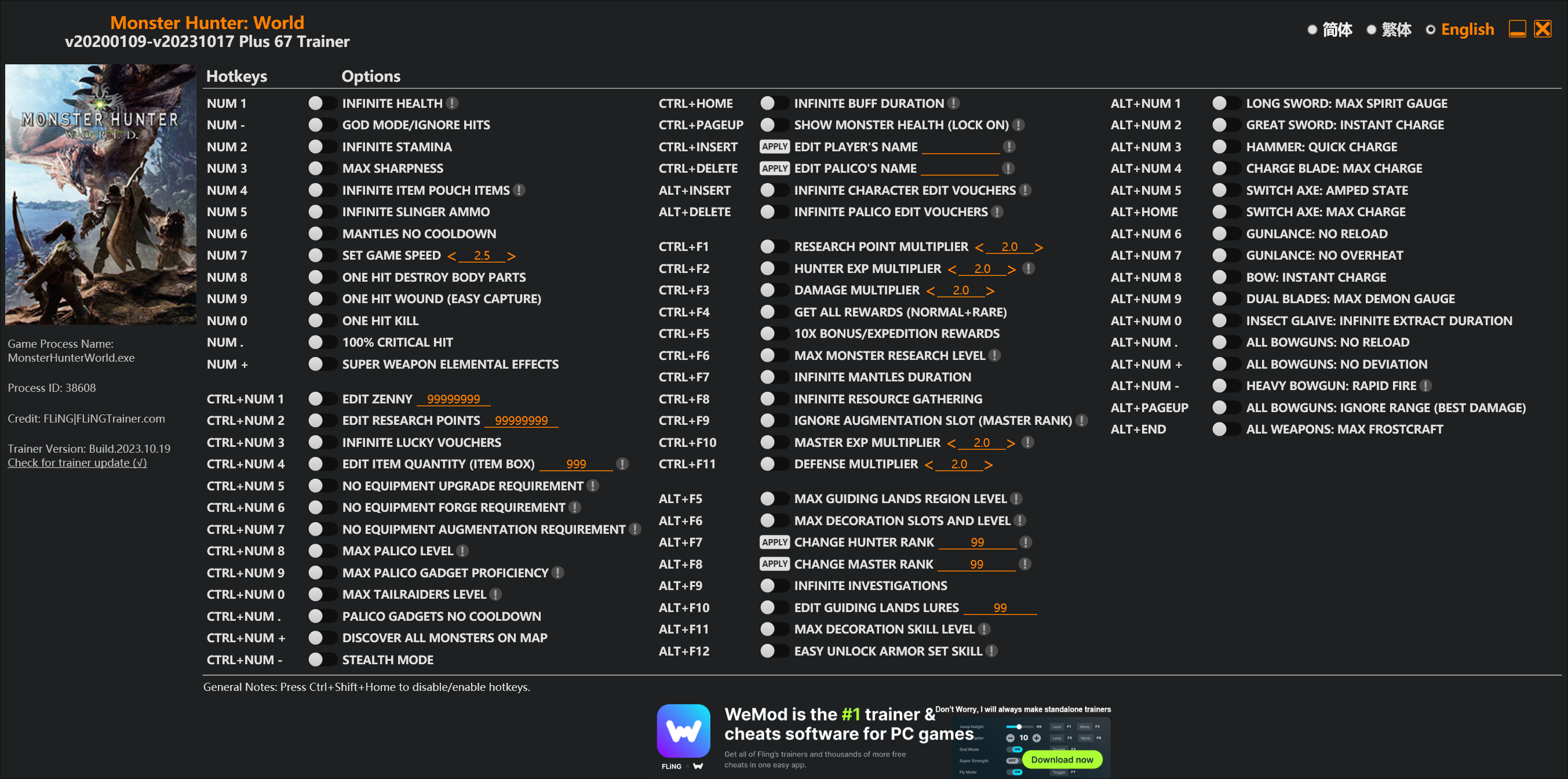
Options
Num 1 – Infinite Health 
Num – – God Mode/Ignore Hits
Num 2 – Infinite Stamina
Num 3 – Max Sharpness
Num 4 – Infinite Item Pouch Items
Num 5 – Infinite Slinger Ammo
Num 6 – Mantles No Cooldown
Num 7 – Set Game Speed
Num 8 – One Hit Destroy Body Parts
Num 9 – One Hit Wound (Easy Capture)
Num 0 – One Hit Kill
Num . – 100% Critical Hit
Num + – Super Weapon Elemental Effects
Ctrl+Num 1 – Edit Zenny
Ctrl+Num 2 – Edit Research Points
Ctrl+Num 3 – Infinite Lucky Vouchers
Ctrl+Num 4 – Edit Item Quantity (Item Box)
Ctrl+Num 5 – No Equipment Upgrade Requirement
Ctrl+Num 6 – No Equipment Forge Requirement
Ctrl+Num 7 – No Equipment Augmentation Requirement
Ctrl+Num 8 – Max Palico Level
Ctrl+Num 9 – Max Palico Gadget Proficiency
Ctrl+Num 0 – Max Tailraiders Level
Ctrl+Num . – Palico Gadgets No Cooldown
Ctrl+Num + – Discover All Monsters On Map
Ctrl+Num – – Stealth Mode
Ctrl+Home – Infinite Buff Duration
Ctrl+PageUp – Show Monster Health (Lock On)
Ctrl+Insert – Edit Player’s Name
Ctrl+Delete – Edit Palico’s Name
Alt+Insert – Infinite Character Edit Vouchers
Alt+Delete – Infinite Palico Edit Vouchers
Ctrl+F1 – Research Point Multiplier
Ctrl+F2 – Hunter Exp Multiplier
Ctrl+F3 – Damage Multiplier
Ctrl+F4 – Get All Rewards (Normal+Rare)
Ctrl+F5 – 10x Bonus/Expedition Rewards
Ctrl+F6 – Max Monster Research Level
Ctrl+F7 – Infinite Mantles Duration
Ctrl+F8 – Infinite Resource Gathering
Ctrl+F9 – Ignore Augmentation Slot (Master Rank)
Ctrl+F10 – Master Exp Multiplier
Ctrl+F11 – Defense Multiplier
Alt+F5 – Max Guiding Lands Region Level
Alt+F6 – Max Decoration Slots And Level
Alt+F7 – Change Hunter Rank
Alt+F8 – Change Master Rank
Alt+F9 – Infinite Investigations
Alt+F10 – Edit Guiding Lands Lures
Alt+F11 – Max Decoration Skill Level
Alt+F12 – Easy Unlock Armor Set Skill
Alt+Num 1 – Long Sword: Max Spirit Gauge
Alt+Num 2 – Great Sword: Instant Charge
Alt+Num 3 – Hammer: Quick Charge
Alt+Num 4 – Charge Blade: Max Charge
Alt+Num 5 – Switch Axe: Amped State
Alt+Home – Switch Axe: Max Charge
Alt+Num 6 – Gunlance: No Reload
Alt+Num 7 – Gunlance: No Overheat
Alt+Num 8 – Bow: Instant Charge
Alt+Num 9 – Dual Blades: Max Demon Gauge
Alt+Num 0 – Insect Glaive: Infinite Extract Duration
Alt+Num . – All Bowguns: No Reload
Alt+Num + – All Bowguns: No Deviation
Alt+Num – – Heavy Bowgun: Rapid Fire
Alt+PageUp – All Bowguns: Ignore Range (Best Damage)
Alt+End – All Weapons: Max Frostcraft
Special Notes
If you installed “Stracker’s Loader” and “Performance Booster and Plugin Extender” or other mods, make sure to update them to the latest version or delete them if you don’t use mods, otherwiese the game may crash during startup.
Download
| File | Date added | File size | Downloads |
|---|---|---|---|
 Monster.Hunter.World.v20200109-v20231017.Plus.67.Trainer-FLiNG
|
2023-10-19 10:55 | 926 KB | 1445217 |
|
Monster.Hunter.World.v20200109-v20210602.Plus.67.Trainer-FLiNG
|
2021-06-04 20:24 | 1.33 MB | 497460 |
|
Monster.Hunter.World.v20200109-v20201001.Plus.67.Trainer-FLiNG
|
2020-10-02 08:25 | 1.95 MB | 652621 |
|
Monster.Hunter.World.v20200109-v20201001.Plus.14.Trainer-FLiNG
|
2020-10-01 16:39 | 1.04 MB | 182924 |
















再安装“Performance Booster and Plugin Extender”MOD,链接:https://www.nexusmods.com/monsterhunterworld/mods/3473
這個下載不了
Stracker’s Loader也是無法下載按了沒有反應
如果你以前装过MOD,那么PLUGINS里有个文件,名字叫做MantleRemover.dll,要把这个文件删掉,然后把!CRCBypass.dll放进去,然后再把dtdata.dll loader.dll loader-config放进游戏目录里,就可以了,其实N网里的有说明,就是删掉PLUGINS里的MantleRemover.dll,不然游戏直接打不开。。。
我沒有這個文件 , 我沒有安裝過其他模組.但是把那個Stracker’s Loader 三個文件放進去遊戲檔案之後也會閃退
GG
一直显示加载失败有没有教一下啊
月影大哥沒有其他方法了嗎,這次更新的修改器開啟的方法有點難搞呀
为啥一开功能游戏就闪退啊,之前的的那个版本怎么没事啊,能不能把这个修改器完善一下
我的VC_redist.x64安裝不了,他記錄檔是在這樣的。可以幫我看看為什麼嗎?
[1C90:08CC][2020-10-03T14:02:45]i001: Burn v3.10.4.4718, Windows v6.2 (Build 9200: Service Pack 0), path: C:\Users\OMEN\AppData\Local\Temp\{F2B5A684-305B-4A84-9219-B55A2159159F}\.cr\VC_redist.x64.exe
[1C90:08CC][2020-10-03T14:02:45]i009: Command Line: ‘-burn.clean.room=C:\Users\OMEN\Desktop\VC_redist.x64.exe -burn.filehandle.attached=772 -burn.filehandle.self=836’
[1C90:08CC][2020-10-03T14:02:45]i000: Setting string variable ‘WixBundleOriginalSource’ to value ‘C:\Users\OMEN\Desktop\VC_redist.x64.exe’
[1C90:08CC][2020-10-03T14:02:45]i000: Setting string variable ‘WixBundleOriginalSourceFolder’ to value ‘C:\Users\OMEN\Desktop\’
[1C90:08CC][2020-10-03T14:02:46]i000: Setting string variable ‘WixBundleLog’ to value ‘C:\Users\OMEN\AppData\Local\Temp\dd_vcredist_amd64_20201003140246.log’
[1C90:08CC][2020-10-03T14:02:46]i000: Setting string variable ‘WixBundleManufacturer’ to value ‘Microsoft Corporation’
[1C90:2A8C][2020-10-03T14:02:46]i000: Setting version variable ‘WixBundleFileVersion’ to value ‘14.27.29112.0’
[1C90:08CC][2020-10-03T14:02:46]i100: Detect begin, 10 packages
[1C90:08CC][2020-10-03T14:02:46]i000: Setting version variable ‘windows_uCRT_DetectKey’ to value ‘10.0.18362.1110’
[1C90:08CC][2020-10-03T14:02:46]i000: Setting numeric variable ‘windows_uCRT_DetectKeyExists’ to value 1
[1C90:08CC][2020-10-03T14:02:46]i052: Condition ‘(VersionNT = v6.3 AND NOT VersionNT64) AND (windows_uCRT_DetectKeyExists AND windows_uCRT_DetectKey >= v10.0.10240.0)’ evaluates to false.
[1C90:08CC][2020-10-03T14:02:46]i052: Condition ‘(VersionNT = v6.3 AND VersionNT64) AND (windows_uCRT_DetectKeyExists AND windows_uCRT_DetectKey >= v10.0.10240.0)’ evaluates to false.
[1C90:08CC][2020-10-03T14:02:46]i052: Condition ‘(VersionNT = v6.2 AND NOT VersionNT64) AND (windows_uCRT_DetectKeyExists AND windows_uCRT_DetectKey >= v10.0.10240.0)’ evaluates to false.
[1C90:08CC][2020-10-03T14:02:46]i052: Condition ‘(VersionNT = v6.2 AND VersionNT64) AND (windows_uCRT_DetectKeyExists AND windows_uCRT_DetectKey >= v10.0.10240.0)’ evaluates to true.
[1C90:08CC][2020-10-03T14:02:46]i052: Condition ‘(VersionNT = v6.1 AND NOT VersionNT64) AND (windows_uCRT_DetectKeyExists AND windows_uCRT_DetectKey >= v10.0.10240.0)’ evaluates to false.
[1C90:08CC][2020-10-03T14:02:46]i052: Condition ‘(VersionNT = v6.1 AND VersionNT64) AND (windows_uCRT_DetectKeyExists AND windows_uCRT_DetectKey >= v10.0.10240.0)’ evaluates to false.
[1C90:08CC][2020-10-03T14:02:46]i052: Condition ‘(VersionNT = v6.0 AND NOT VersionNT64) AND (windows_uCRT_DetectKeyExists AND windows_uCRT_DetectKey >= v10.0.10240.0)’ evaluates to false.
[1C90:08CC][2020-10-03T14:02:46]i052: Condition ‘(VersionNT = v6.0 AND VersionNT64) AND (windows_uCRT_DetectKeyExists AND windows_uCRT_DetectKey >= v10.0.10240.0)’ evaluates to false.
[1C90:08CC][2020-10-03T14:02:46]i101: Detected package: Windows81_x86, state: Absent, cached: None
[1C90:08CC][2020-10-03T14:02:46]i101: Detected package: Windows81_x64, state: Absent, cached: None
[1C90:08CC][2020-10-03T14:02:46]i101: Detected package: Windows8_x86, state: Absent, cached: None
[1C90:08CC][2020-10-03T14:02:46]i101: Detected package: Windows8_x64, state: Present, cached: None
[1C90:08CC][2020-10-03T14:02:46]i101: Detected package: Windows7_MSU_x86, state: Absent, cached: None
[1C90:08CC][2020-10-03T14:02:46]i101: Detected package: Windows7_MSU_x64, state: Absent, cached: None
[1C90:08CC][2020-10-03T14:02:46]i101: Detected package: WindowsVista_MSU_x86, state: Absent, cached: None
[1C90:08CC][2020-10-03T14:02:46]i101: Detected package: WindowsVista_MSU_x64, state: Absent, cached: None
[1C90:08CC][2020-10-03T14:02:46]i101: Detected package: vcRuntimeMinimum_x64, state: Present, cached: Complete
[1C90:08CC][2020-10-03T14:02:46]i101: Detected package: vcRuntimeAdditional_x64, state: Present, cached: Complete
[1C90:08CC][2020-10-03T14:02:46]i052: Condition ‘VersionNT64 >= v6.0 OR (VersionNT64 = v5.2 AND ServicePackLevel >= 1)’ evaluates to true.
[1C90:08CC][2020-10-03T14:02:46]i199: Detect complete, result: 0x0
[1C90:08CC][2020-10-03T14:02:47]i200: Plan begin, 10 packages, action: Repair
[1C90:08CC][2020-10-03T14:02:47]i052: Condition ‘VersionNT = v6.3 AND NOT VersionNT64’ evaluates to false.
[1C90:08CC][2020-10-03T14:02:47]w321: Skipping dependency registration on package with no dependency providers: Windows81_x86
[1C90:08CC][2020-10-03T14:02:47]i052: Condition ‘VersionNT = v6.3 AND VersionNT64’ evaluates to false.
[1C90:08CC][2020-10-03T14:02:47]w321: Skipping dependency registration on package with no dependency providers: Windows81_x64
[1C90:08CC][2020-10-03T14:02:47]i052: Condition ‘VersionNT = v6.2 AND NOT VersionNT64’ evaluates to false.
[1C90:08CC][2020-10-03T14:02:47]w321: Skipping dependency registration on package with no dependency providers: Windows8_x86
[1C90:08CC][2020-10-03T14:02:47]i052: Condition ‘VersionNT = v6.2 AND VersionNT64’ evaluates to true.
[1C90:08CC][2020-10-03T14:02:47]w321: Skipping dependency registration on package with no dependency providers: Windows8_x64
[1C90:08CC][2020-10-03T14:02:47]i052: Condition ‘VersionNT = v6.1 AND NOT VersionNT64’ evaluates to false.
[1C90:08CC][2020-10-03T14:02:47]w321: Skipping dependency registration on package with no dependency providers: Windows7_MSU_x86
[1C90:08CC][2020-10-03T14:02:47]i052: Condition ‘VersionNT = v6.1 AND VersionNT64’ evaluates to false.
[1C90:08CC][2020-10-03T14:02:47]w321: Skipping dependency registration on package with no dependency providers: Windows7_MSU_x64
[1C90:08CC][2020-10-03T14:02:47]i052: Condition ‘VersionNT = v6.0 AND NOT VersionNT64’ evaluates to false.
[1C90:08CC][2020-10-03T14:02:47]w321: Skipping dependency registration on package with no dependency providers: WindowsVista_MSU_x86
[1C90:08CC][2020-10-03T14:02:47]i052: Condition ‘VersionNT = v6.0 AND VersionNT64’ evaluates to false.
[1C90:08CC][2020-10-03T14:02:47]w321: Skipping dependency registration on package with no dependency providers: WindowsVista_MSU_x64
[1C90:08CC][2020-10-03T14:02:47]i052: Condition ‘(VersionNT64)’ evaluates to true.
[1C90:08CC][2020-10-03T14:02:47]i000: Setting string variable ‘WixBundleLog_vcRuntimeMinimum_x64’ to value ‘C:\Users\OMEN\AppData\Local\Temp\dd_vcredist_amd64_20201003140246_000_vcRuntimeMinimum_x64.log’
[1C90:08CC][2020-10-03T14:02:47]i052: Condition ‘(VersionNT64)’ evaluates to true.
[1C90:08CC][2020-10-03T14:02:47]i000: Setting string variable ‘WixBundleLog_vcRuntimeAdditional_x64’ to value ‘C:\Users\OMEN\AppData\Local\Temp\dd_vcredist_amd64_20201003140246_001_vcRuntimeAdditional_x64.log’
[1C90:08CC][2020-10-03T14:02:47]i201: Planned package: Windows81_x86, state: Absent, default requested: Absent, ba requested: Absent, execute: None, rollback: None, cache: No, uncache: No, dependency: None
[1C90:08CC][2020-10-03T14:02:47]i201: Planned package: Windows81_x64, state: Absent, default requested: Absent, ba requested: Absent, execute: None, rollback: None, cache: No, uncache: No, dependency: None
[1C90:08CC][2020-10-03T14:02:47]i201: Planned package: Windows8_x86, state: Absent, default requested: Absent, ba requested: Absent, execute: None, rollback: None, cache: No, uncache: No, dependency: None
[1C90:08CC][2020-10-03T14:02:47]i201: Planned package: Windows8_x64, state: Present, default requested: Repair, ba requested: Repair, execute: None, rollback: None, cache: No, uncache: No, dependency: None
[1C90:08CC][2020-10-03T14:02:47]i201: Planned package: Windows7_MSU_x86, state: Absent, default requested: Absent, ba requested: Absent, execute: None, rollback: None, cache: No, uncache: No, dependency: None
[1C90:08CC][2020-10-03T14:02:47]i201: Planned package: Windows7_MSU_x64, state: Absent, default requested: Absent, ba requested: Absent, execute: None, rollback: None, cache: No, uncache: No, dependency: None
[1C90:08CC][2020-10-03T14:02:47]i201: Planned package: WindowsVista_MSU_x86, state: Absent, default requested: Absent, ba requested: Absent, execute: None, rollback: None, cache: No, uncache: No, dependency: None
[1C90:08CC][2020-10-03T14:02:47]i201: Planned package: WindowsVista_MSU_x64, state: Absent, default requested: Absent, ba requested: Absent, execute: None, rollback: None, cache: No, uncache: No, dependency: None
[1C90:08CC][2020-10-03T14:02:47]i201: Planned package: vcRuntimeMinimum_x64, state: Present, default requested: Repair, ba requested: Repair, execute: Repair, rollback: None, cache: No, uncache: No, dependency: Register
[1C90:08CC][2020-10-03T14:02:47]i201: Planned package: vcRuntimeAdditional_x64, state: Present, default requested: Repair, ba requested: Repair, execute: Repair, rollback: None, cache: No, uncache: No, dependency: Register
[1C90:08CC][2020-10-03T14:02:47]i299: Plan complete, result: 0x0
[1C90:08CC][2020-10-03T14:02:47]i300: Apply begin
[1C90:08CC][2020-10-03T14:02:49]i399: Apply complete, result: 0x8007015e, restart: Required, ba requested restart: No
This never worked no matter how many times I’ve tried
방어력 배율 나만 안됨?
严格按照步骤完成了
但是游戏会闪退无法进入
希望有空能够完善一下
It was done in strict accordance with the steps But the game will flash back and cannot enter I hope I can improve it when I have time
Do you guys have ‘Detected an incorrect value in the save data’ error after using the no requirement for upgrades etc?
是
me too
Same problem. How do you fix this error?
我也是这样的问题,该怎么解决啊
i have no idea how do i fix this though. i’ve been trying many different things and it still doesn’t work. any kind souls care to help many innocent people out?
I managed to fix it. I went into the game in offline mode and sold the charm, which for some reason I had upgrade more than possible
which charm is it though? all of it?
I think all the charms, you’ve upgraded using the trainer
alright, i’ll try selling off all the charms i have and re-craft it then
thanks!
In my case, it was the master’s charm. I upgraded it to level 5, although it can only be upgraded to level 4 at the moment. Good luck
You are a legend my friend. Thank you so much for the help dude!
asd
N网我最近抓取不到下载链接 那两个前置mod 能不能放上这里来
i dont know why but its keep crashing even i installed and put stracker file in local mhw file
If it crashing, then you are doing it wrongly.
我的天啊很難搞用不了