
Note: Offline mode only.
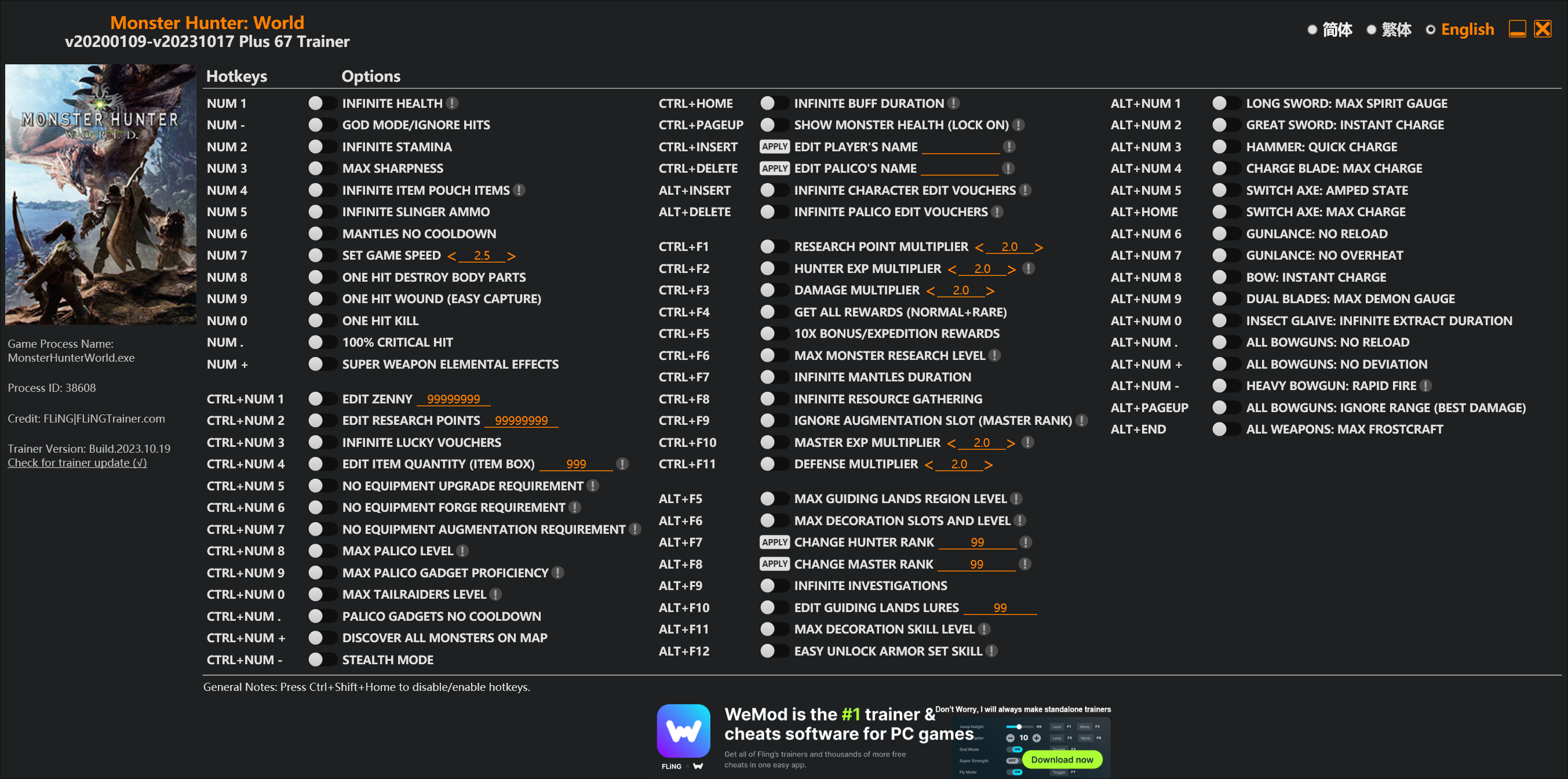
Options
Num 1 – Infinite Health 
Num – – God Mode/Ignore Hits
Num 2 – Infinite Stamina
Num 3 – Max Sharpness
Num 4 – Infinite Item Pouch Items
Num 5 – Infinite Slinger Ammo
Num 6 – Mantles No Cooldown
Num 7 – Set Game Speed
Num 8 – One Hit Destroy Body Parts
Num 9 – One Hit Wound (Easy Capture)
Num 0 – One Hit Kill
Num . – 100% Critical Hit
Num + – Super Weapon Elemental Effects
Ctrl+Num 1 – Edit Zenny
Ctrl+Num 2 – Edit Research Points
Ctrl+Num 3 – Infinite Lucky Vouchers
Ctrl+Num 4 – Edit Item Quantity (Item Box)
Ctrl+Num 5 – No Equipment Upgrade Requirement
Ctrl+Num 6 – No Equipment Forge Requirement
Ctrl+Num 7 – No Equipment Augmentation Requirement
Ctrl+Num 8 – Max Palico Level
Ctrl+Num 9 – Max Palico Gadget Proficiency
Ctrl+Num 0 – Max Tailraiders Level
Ctrl+Num . – Palico Gadgets No Cooldown
Ctrl+Num + – Discover All Monsters On Map
Ctrl+Num – – Stealth Mode
Ctrl+Home – Infinite Buff Duration
Ctrl+PageUp – Show Monster Health (Lock On)
Ctrl+Insert – Edit Player’s Name
Ctrl+Delete – Edit Palico’s Name
Alt+Insert – Infinite Character Edit Vouchers
Alt+Delete – Infinite Palico Edit Vouchers
Ctrl+F1 – Research Point Multiplier
Ctrl+F2 – Hunter Exp Multiplier
Ctrl+F3 – Damage Multiplier
Ctrl+F4 – Get All Rewards (Normal+Rare)
Ctrl+F5 – 10x Bonus/Expedition Rewards
Ctrl+F6 – Max Monster Research Level
Ctrl+F7 – Infinite Mantles Duration
Ctrl+F8 – Infinite Resource Gathering
Ctrl+F9 – Ignore Augmentation Slot (Master Rank)
Ctrl+F10 – Master Exp Multiplier
Ctrl+F11 – Defense Multiplier
Alt+F5 – Max Guiding Lands Region Level
Alt+F6 – Max Decoration Slots And Level
Alt+F7 – Change Hunter Rank
Alt+F8 – Change Master Rank
Alt+F9 – Infinite Investigations
Alt+F10 – Edit Guiding Lands Lures
Alt+F11 – Max Decoration Skill Level
Alt+F12 – Easy Unlock Armor Set Skill
Alt+Num 1 – Long Sword: Max Spirit Gauge
Alt+Num 2 – Great Sword: Instant Charge
Alt+Num 3 – Hammer: Quick Charge
Alt+Num 4 – Charge Blade: Max Charge
Alt+Num 5 – Switch Axe: Amped State
Alt+Home – Switch Axe: Max Charge
Alt+Num 6 – Gunlance: No Reload
Alt+Num 7 – Gunlance: No Overheat
Alt+Num 8 – Bow: Instant Charge
Alt+Num 9 – Dual Blades: Max Demon Gauge
Alt+Num 0 – Insect Glaive: Infinite Extract Duration
Alt+Num . – All Bowguns: No Reload
Alt+Num + – All Bowguns: No Deviation
Alt+Num – – Heavy Bowgun: Rapid Fire
Alt+PageUp – All Bowguns: Ignore Range (Best Damage)
Alt+End – All Weapons: Max Frostcraft
Special Notes
If you installed “Stracker’s Loader” and “Performance Booster and Plugin Extender” or other mods, make sure to update them to the latest version or delete them if you don’t use mods, otherwiese the game may crash during startup.
Download
| File | Date added | File size | Downloads |
|---|---|---|---|
 Monster.Hunter.World.v20200109-v20231017.Plus.67.Trainer-FLiNG
|
2023-10-19 10:55 | 926 KB | 1445234 |
|
Monster.Hunter.World.v20200109-v20210602.Plus.67.Trainer-FLiNG
|
2021-06-04 20:24 | 1.33 MB | 497460 |
|
Monster.Hunter.World.v20200109-v20201001.Plus.67.Trainer-FLiNG
|
2020-10-02 08:25 | 1.95 MB | 652621 |
|
Monster.Hunter.World.v20200109-v20201001.Plus.14.Trainer-FLiNG
|
2020-10-01 16:39 | 1.04 MB | 182924 |















有没有教程啊
For everyone with problems:
1. first download visual c++ redistributable to avoid any errors
https://support.microsoft.com/en-us/help/2977003/the-latest-supported-visual-c-downloads
2. download strackers loader an extract all files to the mainfolder (\SteamLibrary\steamapps\common\Monster Hunter World)
3. download “Performance Booster and Plugin Extender” and copy the nativePC folder to your mainfolder, or if you already have the nativePC folder, drop the files from the new folder to your existing folder
4. start mhw and the trainer. thats it, have fun
does this fix the error wherein it says i need to launch the game before activating cheats?
游戏速度开了会闪退
than you
Could you do a trainer for Genshin Impact please ?
Update?
请问哪位朋友可以把下载的这两个文件发送到我的邮箱([email protected]),我无法下载,十分感谢
hxd可以发我一份吗[email protected]
也给我发一份呗 [email protected]
dont use this, if you use it then reload the game later then you wont be able to ever go back online, youll be stuck on offline mode forever.
You must be super idiot. Read the trainer red note.
[Note: Offline mode only.]
Either you’re too stupid to understand or too blind to read the red note.
Please make a trainer for Panzer Dragon Remake.
風神大大,裝了mod就不能上綫了,那是不是只要把mod拿出資料夾,就可以回到綫上模式了???
Thanks for the update.
Is there any way to give us a cheat that would give us all the different decorations?
There’s like a billion different 4 slot gems, and trying to get all the different ones is a pain. It would be great if there was a way to either just add all the charms, or edit charms in our box to change them into different ones.
you ask too much dumbass, been eyeing on your comments, why not play the game and grind jews. youre being spoonfed too much IRL LMFAO
Look for any goddamn cheat engine for that. Dont be lazy.
更新了重装了2次VC,一把mod拉进游戏文件夹就闪退
Ok, this working for me for 67 versions. How I do it?
1. I install both X64 & X86 Microsoft C++ in the link given.
2. I restart my PC.
3. I download both file Stacker’s Loader and Performance Booster and Plugin Extender.
4. I unzip both files to Desktop.
In stacker’s loader file: there are 3 files. Copy all of them in root folder of your MHW game installation folder. In my case : C:\Program Files (x86)\Steam\steamapps\common\Monster Hunter World.
In Performance Booster and Plugins Extender files, there will be one folder: nativePC. You don’t need to copy the file inside nativePC but instead, you need to copy the nativePC folder itself to the root folder of MHW which in my case : C:\Program Files (x86)\Steam\steamapps\common\Monster Hunter World
I hope this will help you guys. Happy hunting everybody
Can anyone else confirm if this will kick you straight to offline mode? Trying to play with friends and mess around with the trainer together.
yup, some option in trainer will force you to go offline
那两个链接点进去网页加载不出来,是不是要挂加速器