
Note: Offline mode only.
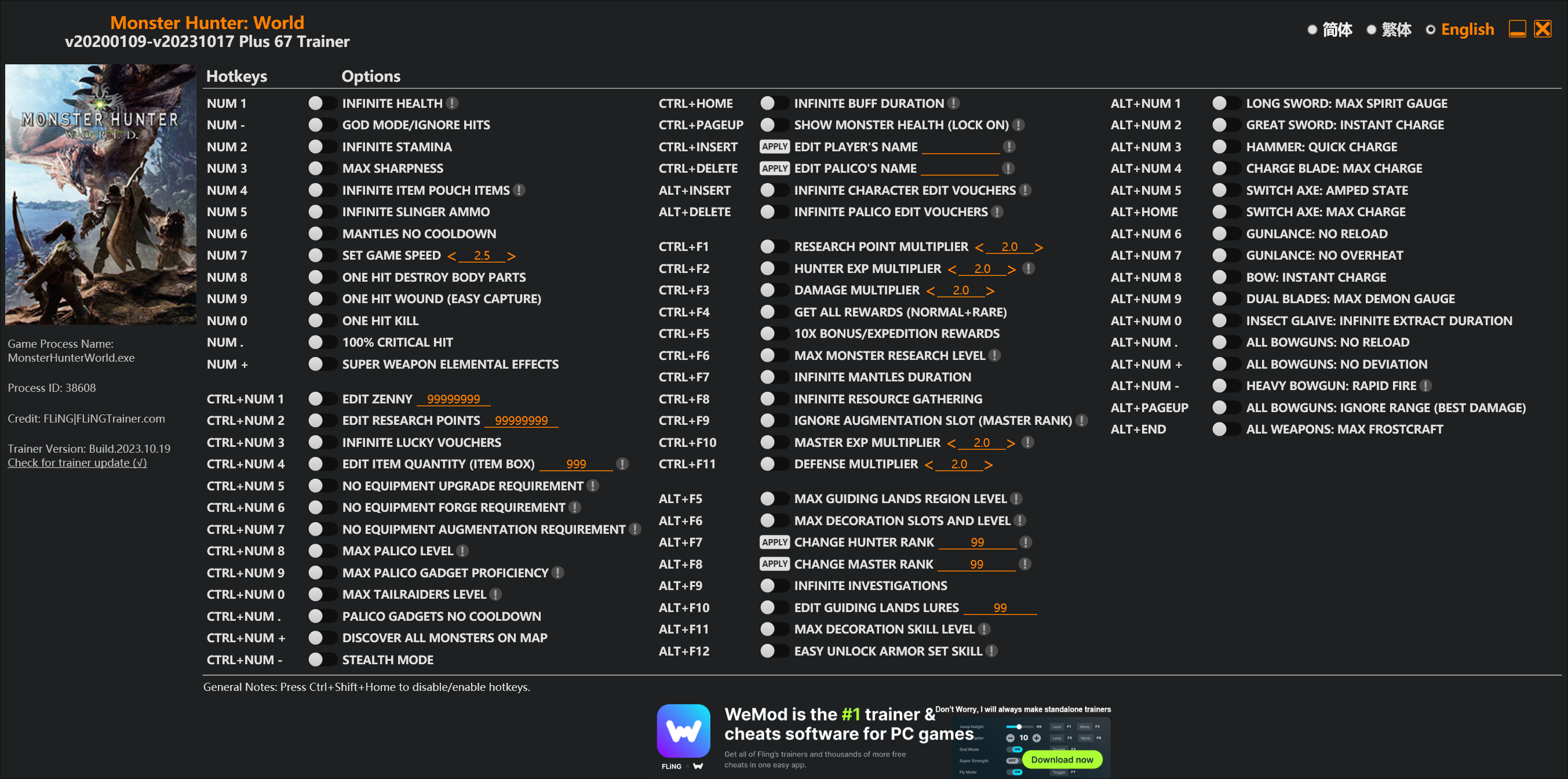
Options
Num 1 – Infinite Health 
Num – – God Mode/Ignore Hits
Num 2 – Infinite Stamina
Num 3 – Max Sharpness
Num 4 – Infinite Item Pouch Items
Num 5 – Infinite Slinger Ammo
Num 6 – Mantles No Cooldown
Num 7 – Set Game Speed
Num 8 – One Hit Destroy Body Parts
Num 9 – One Hit Wound (Easy Capture)
Num 0 – One Hit Kill
Num . – 100% Critical Hit
Num + – Super Weapon Elemental Effects
Ctrl+Num 1 – Edit Zenny
Ctrl+Num 2 – Edit Research Points
Ctrl+Num 3 – Infinite Lucky Vouchers
Ctrl+Num 4 – Edit Item Quantity (Item Box)
Ctrl+Num 5 – No Equipment Upgrade Requirement
Ctrl+Num 6 – No Equipment Forge Requirement
Ctrl+Num 7 – No Equipment Augmentation Requirement
Ctrl+Num 8 – Max Palico Level
Ctrl+Num 9 – Max Palico Gadget Proficiency
Ctrl+Num 0 – Max Tailraiders Level
Ctrl+Num . – Palico Gadgets No Cooldown
Ctrl+Num + – Discover All Monsters On Map
Ctrl+Num – – Stealth Mode
Ctrl+Home – Infinite Buff Duration
Ctrl+PageUp – Show Monster Health (Lock On)
Ctrl+Insert – Edit Player’s Name
Ctrl+Delete – Edit Palico’s Name
Alt+Insert – Infinite Character Edit Vouchers
Alt+Delete – Infinite Palico Edit Vouchers
Ctrl+F1 – Research Point Multiplier
Ctrl+F2 – Hunter Exp Multiplier
Ctrl+F3 – Damage Multiplier
Ctrl+F4 – Get All Rewards (Normal+Rare)
Ctrl+F5 – 10x Bonus/Expedition Rewards
Ctrl+F6 – Max Monster Research Level
Ctrl+F7 – Infinite Mantles Duration
Ctrl+F8 – Infinite Resource Gathering
Ctrl+F9 – Ignore Augmentation Slot (Master Rank)
Ctrl+F10 – Master Exp Multiplier
Ctrl+F11 – Defense Multiplier
Alt+F5 – Max Guiding Lands Region Level
Alt+F6 – Max Decoration Slots And Level
Alt+F7 – Change Hunter Rank
Alt+F8 – Change Master Rank
Alt+F9 – Infinite Investigations
Alt+F10 – Edit Guiding Lands Lures
Alt+F11 – Max Decoration Skill Level
Alt+F12 – Easy Unlock Armor Set Skill
Alt+Num 1 – Long Sword: Max Spirit Gauge
Alt+Num 2 – Great Sword: Instant Charge
Alt+Num 3 – Hammer: Quick Charge
Alt+Num 4 – Charge Blade: Max Charge
Alt+Num 5 – Switch Axe: Amped State
Alt+Home – Switch Axe: Max Charge
Alt+Num 6 – Gunlance: No Reload
Alt+Num 7 – Gunlance: No Overheat
Alt+Num 8 – Bow: Instant Charge
Alt+Num 9 – Dual Blades: Max Demon Gauge
Alt+Num 0 – Insect Glaive: Infinite Extract Duration
Alt+Num . – All Bowguns: No Reload
Alt+Num + – All Bowguns: No Deviation
Alt+Num – – Heavy Bowgun: Rapid Fire
Alt+PageUp – All Bowguns: Ignore Range (Best Damage)
Alt+End – All Weapons: Max Frostcraft
Special Notes
If you installed “Stracker’s Loader” and “Performance Booster and Plugin Extender” or other mods, make sure to update them to the latest version or delete them if you don’t use mods, otherwiese the game may crash during startup.
Download
| File | Date added | File size | Downloads |
|---|---|---|---|
 Monster.Hunter.World.v20200109-v20231017.Plus.67.Trainer-FLiNG
|
2023-10-19 10:55 | 926 KB | 1444657 |
|
Monster.Hunter.World.v20200109-v20210602.Plus.67.Trainer-FLiNG
|
2021-06-04 20:24 | 1.33 MB | 497439 |
|
Monster.Hunter.World.v20200109-v20201001.Plus.67.Trainer-FLiNG
|
2020-10-02 08:25 | 1.95 MB | 652614 |
|
Monster.Hunter.World.v20200109-v20201001.Plus.14.Trainer-FLiNG
|
2020-10-01 16:39 | 1.04 MB | 182921 |













两个mod怎么用啊,都是程序拓展文件怎么安装?不行吗?有能拥的大佬发一下呗[email protected]
我下载了,但是打开游戏修改器还是显示不能用,问下下载好了怎么用
下载两个文件 要在外网下载 好像要注册 下载好以后解压到游戏根目录 先解压S开头的文件 再解压P开头文件 覆盖一下 就能用67修改器了 实在不行就只能用14的那个 14那个不用装其他东西
It doesn’t work for me, I followed the steps, installed everything, but the game crashes at the start…
me 2… Help me!
I keep getting this error while trying to activate things:
—————————
Error Message
—————————
Address not found, please try to restart the game & trainer.
If this error still occur, please contact me at FLiNGTrainer.com or at 3DMGAME.
Be sure to include the following data (Press Ctrl+C to copy).
Process ID: 000013F4
Search Range: 0000000146000000 – 0000000163ED2000
Bytes Searched: 478.83 MB
Signature: 48 8B 81 ** ** 00 00 F3 0F 10 05 ** ** ** ** 0F 2F 40 6C 72 ** B8 02 00 00 00 E9
Trainer Version: Monster Hunter World v20200109-v20200603 Plus 67 Trainer
and an error saying its unable to start a remote thread (Error Code:5)
same problem
Hi, the 67 options trainer is seen as a virus by my PC which refuses to open it for this reason. This came after a couple of days in which I used it successfully,
yeah i keep getting a virus warning as well for the 67 options and my pc instantly deletes the trainer
mod下了 放在怪猎那个文件夹里了 但是还是找不到游戏路径
不能用,一直叫我下载 MOD
道具9999會在使用弩箭時使遊戲跳出
描述得不夠詳細,使用地上的設置武器弩槍
弩砲才對
failed to load “nativePC\\plugins\\!CRCBypass.dll”
btw
crashes by starting even without bypass (yes visual c is installed)
put it on your MHW local files jadi
For the files required for the 67 option, where do I place the extracted files?
on the local files of Monster Hunter World
To get the 67 option working, look for your Steam Folder> steam apps> common> Monster Hunter World
You could also go to your steam launcher then right click MHW, scroll over to “Manage” then click on “Browse Local Files”
From there open “Fatalis Patch” you downloaded and drag and drop “nativePC” to Monster Hunter World
From “Stracker’s Loader” move EVERYTHING (should be only 3 files) to Monster Hunter World
That should be all.
Note* you will get kicked to offline after some time of use but it shouldn’t matter too much unless you’re playing with friends.
Edit to the Note*
If you get kicked to offline and finish your quest but get a message when you click on the events tab (haven’t tried any other) it’s easily solved by creating a new online lobby.
I never have had disconnect issues. must be your internet lol (and it kicks you if you try to oneshot monsters or set their health to 1)
tried this, my game crashed every time even though I have Microsoft C++ updated
any other steps?
For “Stracker’s Loader”, I moved all 3 files to the MHW folder. As for the “Fatalis Patch”, I moved “nativePC” to the MHW folder. I opened the trainer and then the game, and it still crashes? I have the Microsoft Visual C++ 2015-2019 Redistributable (x86). I don’t understand what I’m doing wrong. The old trainer worked perfectly before the Fatalis patch.
Things are a bit crazy right now. The Fatalis update changed a lot. We just have to wait for Fling to update the trainer so we can all use the 67 without the extra MOD downloads. A lot of people aren’t getting it to work.
It’s weird because some people got it to work.
thank u , GOOD WORK. I was surprised at the just ON TIME responding.
still work?
bro, will it work on the monster hunter world base game?
求大佬mod [email protected]