
Note: Offline mode only.
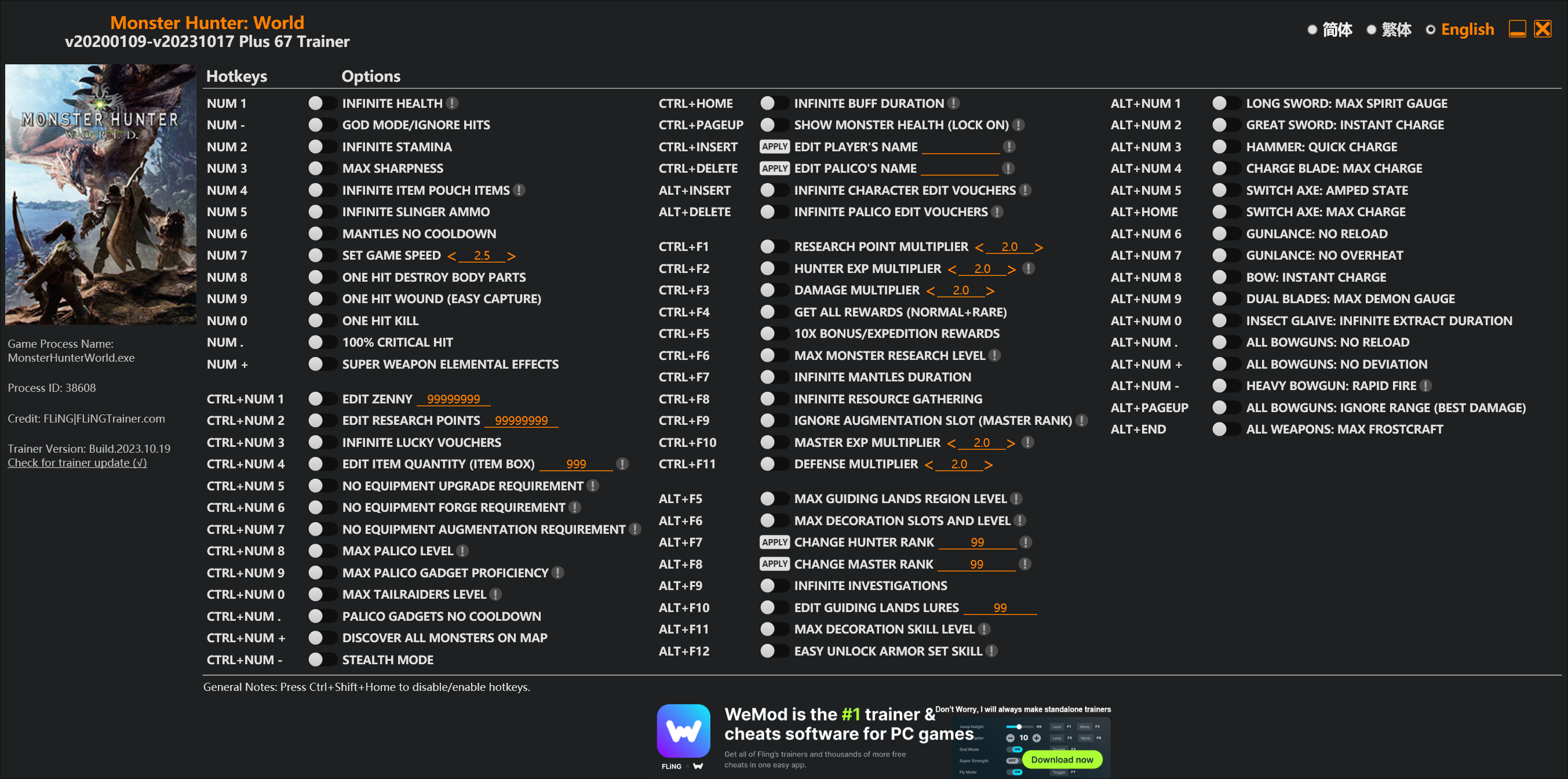
Options
Num 1 – Infinite Health 
Num – – God Mode/Ignore Hits
Num 2 – Infinite Stamina
Num 3 – Max Sharpness
Num 4 – Infinite Item Pouch Items
Num 5 – Infinite Slinger Ammo
Num 6 – Mantles No Cooldown
Num 7 – Set Game Speed
Num 8 – One Hit Destroy Body Parts
Num 9 – One Hit Wound (Easy Capture)
Num 0 – One Hit Kill
Num . – 100% Critical Hit
Num + – Super Weapon Elemental Effects
Ctrl+Num 1 – Edit Zenny
Ctrl+Num 2 – Edit Research Points
Ctrl+Num 3 – Infinite Lucky Vouchers
Ctrl+Num 4 – Edit Item Quantity (Item Box)
Ctrl+Num 5 – No Equipment Upgrade Requirement
Ctrl+Num 6 – No Equipment Forge Requirement
Ctrl+Num 7 – No Equipment Augmentation Requirement
Ctrl+Num 8 – Max Palico Level
Ctrl+Num 9 – Max Palico Gadget Proficiency
Ctrl+Num 0 – Max Tailraiders Level
Ctrl+Num . – Palico Gadgets No Cooldown
Ctrl+Num + – Discover All Monsters On Map
Ctrl+Num – – Stealth Mode
Ctrl+Home – Infinite Buff Duration
Ctrl+PageUp – Show Monster Health (Lock On)
Ctrl+Insert – Edit Player’s Name
Ctrl+Delete – Edit Palico’s Name
Alt+Insert – Infinite Character Edit Vouchers
Alt+Delete – Infinite Palico Edit Vouchers
Ctrl+F1 – Research Point Multiplier
Ctrl+F2 – Hunter Exp Multiplier
Ctrl+F3 – Damage Multiplier
Ctrl+F4 – Get All Rewards (Normal+Rare)
Ctrl+F5 – 10x Bonus/Expedition Rewards
Ctrl+F6 – Max Monster Research Level
Ctrl+F7 – Infinite Mantles Duration
Ctrl+F8 – Infinite Resource Gathering
Ctrl+F9 – Ignore Augmentation Slot (Master Rank)
Ctrl+F10 – Master Exp Multiplier
Ctrl+F11 – Defense Multiplier
Alt+F5 – Max Guiding Lands Region Level
Alt+F6 – Max Decoration Slots And Level
Alt+F7 – Change Hunter Rank
Alt+F8 – Change Master Rank
Alt+F9 – Infinite Investigations
Alt+F10 – Edit Guiding Lands Lures
Alt+F11 – Max Decoration Skill Level
Alt+F12 – Easy Unlock Armor Set Skill
Alt+Num 1 – Long Sword: Max Spirit Gauge
Alt+Num 2 – Great Sword: Instant Charge
Alt+Num 3 – Hammer: Quick Charge
Alt+Num 4 – Charge Blade: Max Charge
Alt+Num 5 – Switch Axe: Amped State
Alt+Home – Switch Axe: Max Charge
Alt+Num 6 – Gunlance: No Reload
Alt+Num 7 – Gunlance: No Overheat
Alt+Num 8 – Bow: Instant Charge
Alt+Num 9 – Dual Blades: Max Demon Gauge
Alt+Num 0 – Insect Glaive: Infinite Extract Duration
Alt+Num . – All Bowguns: No Reload
Alt+Num + – All Bowguns: No Deviation
Alt+Num – – Heavy Bowgun: Rapid Fire
Alt+PageUp – All Bowguns: Ignore Range (Best Damage)
Alt+End – All Weapons: Max Frostcraft
Special Notes
If you installed “Stracker’s Loader” and “Performance Booster and Plugin Extender” or other mods, make sure to update them to the latest version or delete them if you don’t use mods, otherwiese the game may crash during startup.
Download
| File | Date added | File size | Downloads |
|---|---|---|---|
 Monster.Hunter.World.v20200109-v20231017.Plus.67.Trainer-FLiNG
|
2023-10-19 10:55 | 926 KB | 1441547 |
|
Monster.Hunter.World.v20200109-v20210602.Plus.67.Trainer-FLiNG
|
2021-06-04 20:24 | 1.33 MB | 497365 |
|
Monster.Hunter.World.v20200109-v20201001.Plus.67.Trainer-FLiNG
|
2020-10-02 08:25 | 1.95 MB | 652577 |
|
Monster.Hunter.World.v20200109-v20201001.Plus.14.Trainer-FLiNG
|
2020-10-01 16:39 | 1.04 MB | 182897 |









No
14 options working fine , 67 won’t detect game or crashes after installing plugins from Nexus despite update .
hello, does the 14 options needed stracker’s loader?
keeps saying game not detected…..
Why can’t you answer? fling?
anyone else not able to open their trainer up. mine says it canceled due to it having a virus but ive used it before just fine
plz update 15.02 ♥
Just update Stracker’s loader. The trainer still works with the updated version
为什么我重新下载却失败,我把反病毒关掉了还是失败
why i download and it is failed, i turn off my virus protection still fail
I have both the mods installed and all of the current visual studios files. When I launch MHW and the trainer I get an error where the trainer is unable to find the MHW .exe
一使用游戏就直接闪退~~希望风大能更新一下,谢谢诶
Cannot execute “C:\Users\AppData\Local\Temp\Rar$EXa10508.4560\67 options, mod required\Monster Hunter World v20200109-v20201001 Plus 67 Trainer.exe”
it shows up when I open 67 options, i’ve update Stracker’s loader and it still shows up
Try to install the Stracker’s Mod manually. I had the same problem. It is caused, because the Mod-Loader (Vortex) install the update in the wrong folder. just install it in your games-folder, wehere the .exe is and it works fine.
Put the fling trainer where the .exe for mhw game is. Then open up the trainer from there. I had the same message and that cleared it up. It’s trying to find the game and it’s using the wrong location.
The Trainer needs an Upadate. Strackers Mod Loader got an Update and the Trainer is not detecting the Game, if Strackers Mod is installed
the one with 67 Options, I mean. The 14 Options-Version still works it seems
Correction: It works just fine, the problem was the Vortex-Mod-Updater.
It seems like the new Stracker’s Mod Loader is installed in the wrong folder. I had to reinstall it manually.
Update 2.0.0
After some update a few days ago the trainer is giving errors on Performance Booster and Plugin Extender, even though I’ve installed both files via Vortex and it worked earlier.
I’ve updated the Strackers, but the error message seems like it’s not registering I have the Performance Booster and Plugin Extender installed. I’ve uninstalled it and reinstalled it, but I’m still getting this error message.
The same thing happens to me that Razgrim gives me an error and no trick works for me.
Vortex installs the strackers and performance booster in the wrong folder. download both manually and install them into your game-exe folder. it will work fine from there.
it’s abug from vortex, considering for the wrong folder…
风大啊,67项的那个一使用游戏就直接崩溃啊~~