
Note: Offline mode only.
Options
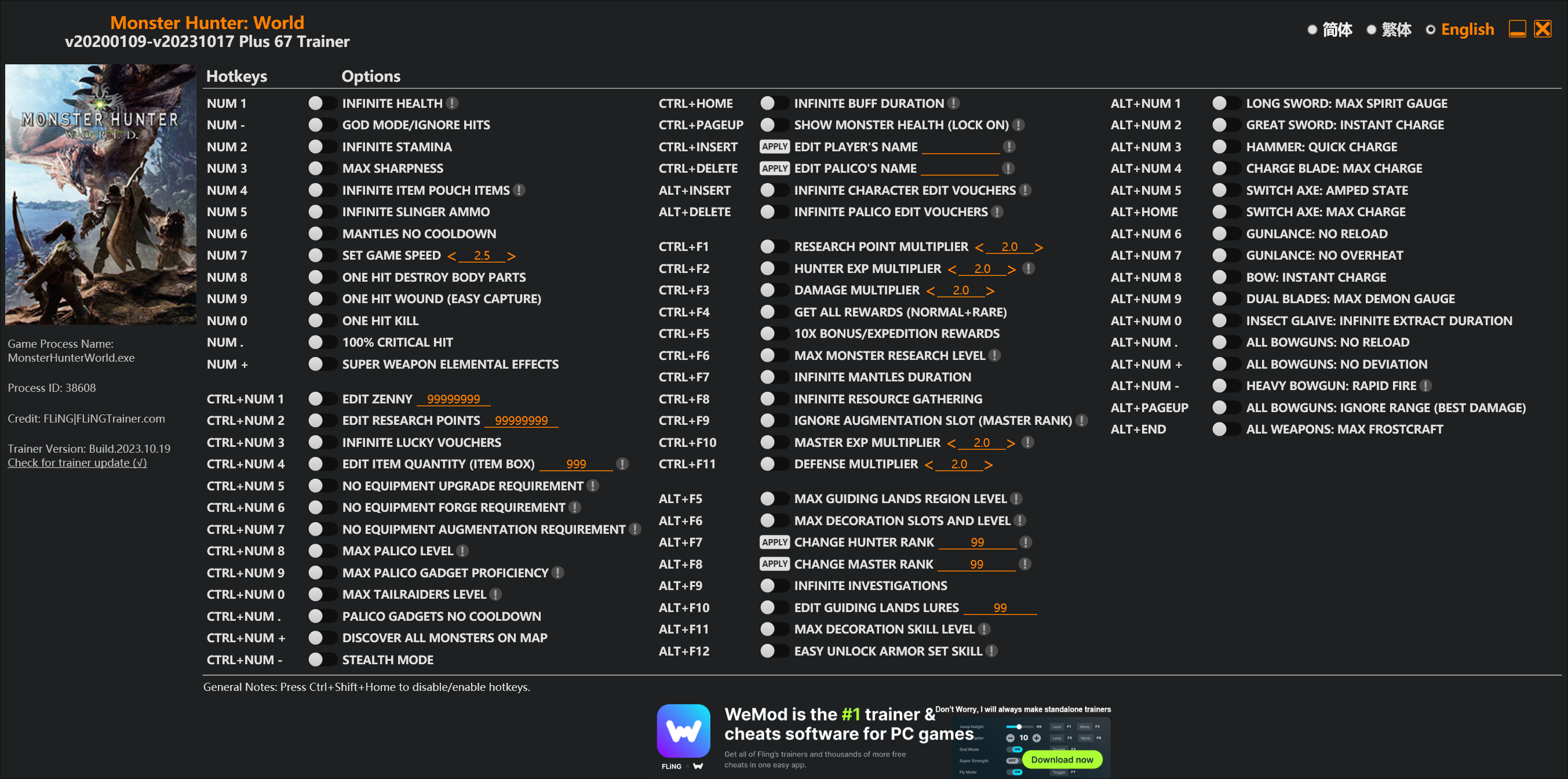
Num 1 – Infinite Health 
Num – – God Mode/Ignore Hits
Num 2 – Infinite Stamina
Num 3 – Max Sharpness
Num 4 – Infinite Item Pouch Items
Num 5 – Infinite Slinger Ammo
Num 6 – Mantles No Cooldown
Num 7 – Set Game Speed
Num 8 – One Hit Destroy Body Parts
Num 9 – One Hit Wound (Easy Capture)
Num 0 – One Hit Kill
Num . – 100% Critical Hit
Num + – Super Weapon Elemental Effects
Ctrl+Num 1 – Edit Zenny
Ctrl+Num 2 – Edit Research Points
Ctrl+Num 3 – Infinite Lucky Vouchers
Ctrl+Num 4 – Edit Item Quantity (Item Box)
Ctrl+Num 5 – No Equipment Upgrade Requirement
Ctrl+Num 6 – No Equipment Forge Requirement
Ctrl+Num 7 – No Equipment Augmentation Requirement
Ctrl+Num 8 – Max Palico Level
Ctrl+Num 9 – Max Palico Gadget Proficiency
Ctrl+Num 0 – Max Tailraiders Level
Ctrl+Num . – Palico Gadgets No Cooldown
Ctrl+Num + – Discover All Monsters On Map
Ctrl+Num – – Stealth Mode
Ctrl+Home – Infinite Buff Duration
Ctrl+PageUp – Show Monster Health (Lock On)
Ctrl+Insert – Edit Player’s Name
Ctrl+Delete – Edit Palico’s Name
Alt+Insert – Infinite Character Edit Vouchers
Alt+Delete – Infinite Palico Edit Vouchers
Ctrl+F1 – Research Point Multiplier
Ctrl+F2 – Hunter Exp Multiplier
Ctrl+F3 – Damage Multiplier
Ctrl+F4 – Get All Rewards (Normal+Rare)
Ctrl+F5 – 10x Bonus/Expedition Rewards
Ctrl+F6 – Max Monster Research Level
Ctrl+F7 – Infinite Mantles Duration
Ctrl+F8 – Infinite Resource Gathering
Ctrl+F9 – Ignore Augmentation Slot (Master Rank)
Ctrl+F10 – Master Exp Multiplier
Ctrl+F11 – Defense Multiplier
Alt+F5 – Max Guiding Lands Region Level
Alt+F6 – Max Decoration Slots And Level
Alt+F7 – Change Hunter Rank
Alt+F8 – Change Master Rank
Alt+F9 – Infinite Investigations
Alt+F10 – Edit Guiding Lands Lures
Alt+F11 – Max Decoration Skill Level
Alt+F12 – Easy Unlock Armor Set Skill
Alt+Num 1 – Long Sword: Max Spirit Gauge
Alt+Num 2 – Great Sword: Instant Charge
Alt+Num 3 – Hammer: Quick Charge
Alt+Num 4 – Charge Blade: Max Charge
Alt+Num 5 – Switch Axe: Amped State
Alt+Home – Switch Axe: Max Charge
Alt+Num 6 – Gunlance: No Reload
Alt+Num 7 – Gunlance: No Overheat
Alt+Num 8 – Bow: Instant Charge
Alt+Num 9 – Dual Blades: Max Demon Gauge
Alt+Num 0 – Insect Glaive: Infinite Extract Duration
Alt+Num . – All Bowguns: No Reload
Alt+Num + – All Bowguns: No Deviation
Alt+Num – – Heavy Bowgun: Rapid Fire
Alt+PageUp – All Bowguns: Ignore Range (Best Damage)
Alt+End – All Weapons: Max Frostcraft
Special Notes
If you installed “Stracker’s Loader” and “Performance Booster and Plugin Extender” or other mods, make sure to update them to the latest version or delete them if you don’t use mods, otherwiese the game may crash during startup.
Download
| File | Date added | File size | Downloads |
|---|---|---|---|
 Monster.Hunter.World.v20200109-v20231017.Plus.67.Trainer-FLiNG
|
2023-10-19 10:55 | 926 KB | 1441700 |
|
Monster.Hunter.World.v20200109-v20210602.Plus.67.Trainer-FLiNG
|
2021-06-04 20:24 | 1.33 MB | 497367 |
|
Monster.Hunter.World.v20200109-v20201001.Plus.67.Trainer-FLiNG
|
2020-10-02 08:25 | 1.95 MB | 652578 |
|
Monster.Hunter.World.v20200109-v20201001.Plus.14.Trainer-FLiNG
|
2020-10-01 16:39 | 1.04 MB | 182898 |












I need step by step video tutorial for this, i can’t make it work
I need step by step video tutorial for this, i can’t make it work
Mine wont load at all. I keep getting windows cannot access the specified device path, or file. You may not have the appropriate permission to access the item. this is for the 67 options, the 14 one will work. Can i plz get help?
Ps i have the mods installed, and my game launches and will play just fine.
well I downloaded everything that was asked of me but the 67 option trainer still says game not found. Correct me if im wrong but I havent anything instructing me of where to put plugins once Ive downloaded them.
Ps. To everyone who was a bit lost like I was: You do have to place the stacker and performance booster files within your game folder for the 67 option trainer to work.
Great mod btw 🙂 I suggest adding that small detail in readme.txt stating where to place the plugins rather than only saying download them
can you please make the tutorial on youtube for that
Monster Hunter World or Monster Hunter World\nativePC\plugins?
I think I might find a way,
You need to copy everything in Stracker’s Loader to the root of the game, not just the things in nativePC
i cant download the 67 mod tool. just keep saying download failed. gas anyone else had this problem or knows a solution?
Please can you add an option to turn off the working sound of the trainer?
If you can’t add an option to turn off the trainer’s sound, please add a pause game option as well. please😢
Still not working.
Ever since this new update, the game freezes after collecting jewels from a hunt. I have to force close the game and lose all my progress. I use Easy Break Parts and 1 Hit Kill. I make sure to turn them both off before going through the reward collection screens but it will still randomly freeze and need to be force closed.
下次背包内容无限 可否也放到14项修改里,很常用也 多谢
请问有详细一点的教程吗0M0电脑新手不知道怎么做才能弄好啊
After the Rise release on PC, pls make the trainer!! thank q & love u
Trainer work fine to me but the game won’t start
Yeah Old mhw work fine also trainer but went i got iceborn and this new trainer the game won’t even start
Ever since this new update, the game freezes after collecting jewels from a hunt.
we want back the free version way we most pay for this and not the other fix this not fear….
the standart version work but the mod version don’t work even if stracker and performance boost are in the nativePC, maybe i missed something
Got both mods installed but still the second trainer doesn’t even detect the game.