
Note: Offline mode only.
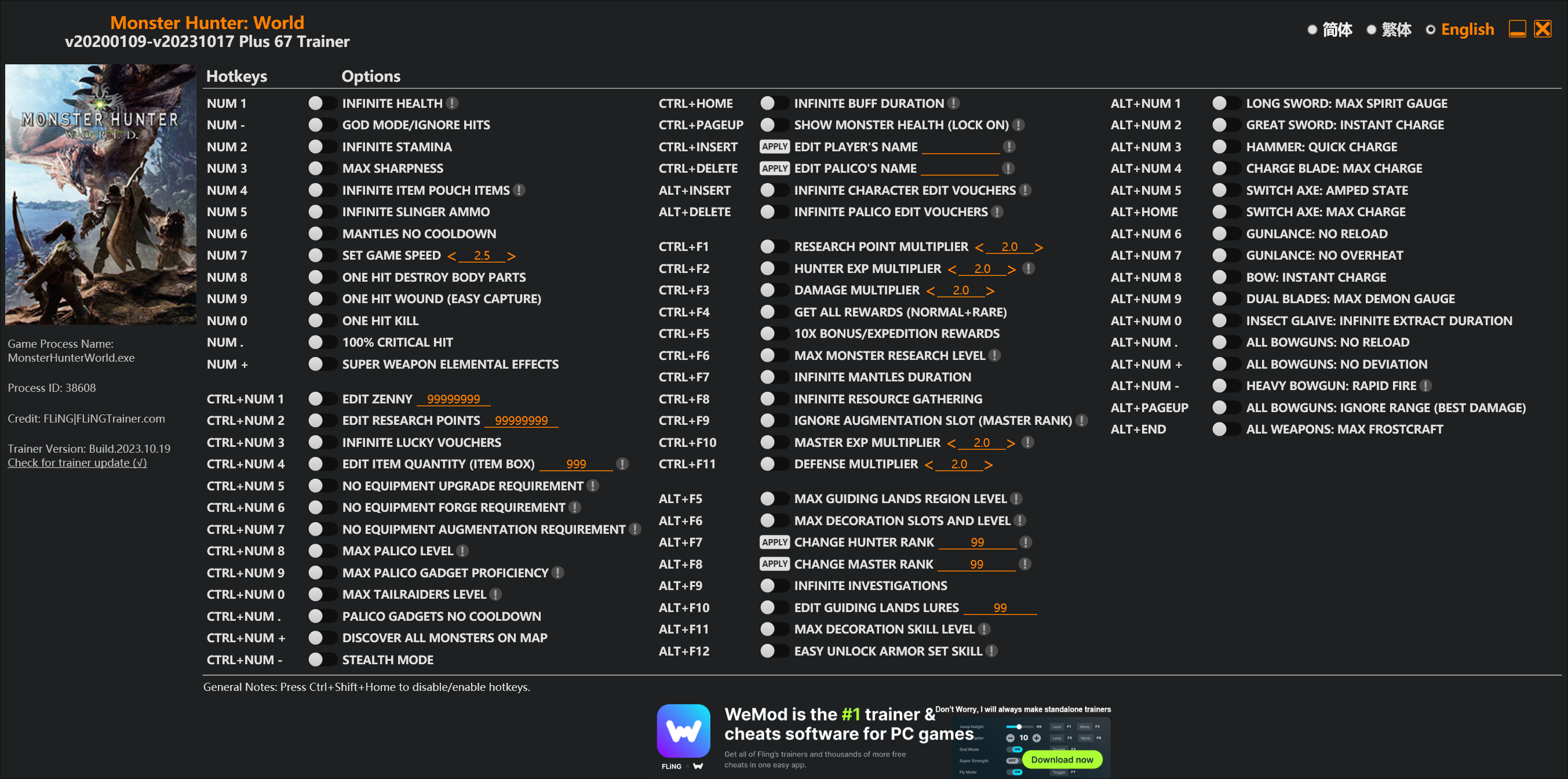
Options
Num 1 – Infinite Health 
Num – – God Mode/Ignore Hits
Num 2 – Infinite Stamina
Num 3 – Max Sharpness
Num 4 – Infinite Item Pouch Items
Num 5 – Infinite Slinger Ammo
Num 6 – Mantles No Cooldown
Num 7 – Set Game Speed
Num 8 – One Hit Destroy Body Parts
Num 9 – One Hit Wound (Easy Capture)
Num 0 – One Hit Kill
Num . – 100% Critical Hit
Num + – Super Weapon Elemental Effects
Ctrl+Num 1 – Edit Zenny
Ctrl+Num 2 – Edit Research Points
Ctrl+Num 3 – Infinite Lucky Vouchers
Ctrl+Num 4 – Edit Item Quantity (Item Box)
Ctrl+Num 5 – No Equipment Upgrade Requirement
Ctrl+Num 6 – No Equipment Forge Requirement
Ctrl+Num 7 – No Equipment Augmentation Requirement
Ctrl+Num 8 – Max Palico Level
Ctrl+Num 9 – Max Palico Gadget Proficiency
Ctrl+Num 0 – Max Tailraiders Level
Ctrl+Num . – Palico Gadgets No Cooldown
Ctrl+Num + – Discover All Monsters On Map
Ctrl+Num – – Stealth Mode
Ctrl+Home – Infinite Buff Duration
Ctrl+PageUp – Show Monster Health (Lock On)
Ctrl+Insert – Edit Player’s Name
Ctrl+Delete – Edit Palico’s Name
Alt+Insert – Infinite Character Edit Vouchers
Alt+Delete – Infinite Palico Edit Vouchers
Ctrl+F1 – Research Point Multiplier
Ctrl+F2 – Hunter Exp Multiplier
Ctrl+F3 – Damage Multiplier
Ctrl+F4 – Get All Rewards (Normal+Rare)
Ctrl+F5 – 10x Bonus/Expedition Rewards
Ctrl+F6 – Max Monster Research Level
Ctrl+F7 – Infinite Mantles Duration
Ctrl+F8 – Infinite Resource Gathering
Ctrl+F9 – Ignore Augmentation Slot (Master Rank)
Ctrl+F10 – Master Exp Multiplier
Ctrl+F11 – Defense Multiplier
Alt+F5 – Max Guiding Lands Region Level
Alt+F6 – Max Decoration Slots And Level
Alt+F7 – Change Hunter Rank
Alt+F8 – Change Master Rank
Alt+F9 – Infinite Investigations
Alt+F10 – Edit Guiding Lands Lures
Alt+F11 – Max Decoration Skill Level
Alt+F12 – Easy Unlock Armor Set Skill
Alt+Num 1 – Long Sword: Max Spirit Gauge
Alt+Num 2 – Great Sword: Instant Charge
Alt+Num 3 – Hammer: Quick Charge
Alt+Num 4 – Charge Blade: Max Charge
Alt+Num 5 – Switch Axe: Amped State
Alt+Home – Switch Axe: Max Charge
Alt+Num 6 – Gunlance: No Reload
Alt+Num 7 – Gunlance: No Overheat
Alt+Num 8 – Bow: Instant Charge
Alt+Num 9 – Dual Blades: Max Demon Gauge
Alt+Num 0 – Insect Glaive: Infinite Extract Duration
Alt+Num . – All Bowguns: No Reload
Alt+Num + – All Bowguns: No Deviation
Alt+Num – – Heavy Bowgun: Rapid Fire
Alt+PageUp – All Bowguns: Ignore Range (Best Damage)
Alt+End – All Weapons: Max Frostcraft
Special Notes
If you installed “Stracker’s Loader” and “Performance Booster and Plugin Extender” or other mods, make sure to update them to the latest version or delete them if you don’t use mods, otherwiese the game may crash during startup.
Download
| File | Date added | File size | Downloads |
|---|---|---|---|
 Monster.Hunter.World.v20200109-v20231017.Plus.67.Trainer-FLiNG
|
2023-10-19 10:55 | 926 KB | 1441701 |
|
Monster.Hunter.World.v20200109-v20210602.Plus.67.Trainer-FLiNG
|
2021-06-04 20:24 | 1.33 MB | 497367 |
|
Monster.Hunter.World.v20200109-v20201001.Plus.67.Trainer-FLiNG
|
2020-10-02 08:25 | 1.95 MB | 652578 |
|
Monster.Hunter.World.v20200109-v20201001.Plus.14.Trainer-FLiNG
|
2020-10-01 16:39 | 1.04 MB | 182898 |











this is not working for me i have installed the mods i have used vortex i have used it without vortex no matter what i do when i use the 67 trainer it tells me i have to install those two mods even though i can clearly see them there its like the trainer is not detecting them or something
I have a diff issue where the trainer doesnt detect the game at all lol How do i fix this? These mods were a godsend in the past but after fatalis something went fishy
hey I get that when I try to use your software, can you help me?
Overwise you do to a great job carry on!
—————————
Error Message
—————————
Address not found, please try to restart the game & trainer.
If this error still occur, please contact me at FLiNGTrainer.com or at 3DMGAME.
Be sure to include the following data (Press Ctrl+C to copy).
Process ID: 000072D4
Search Range: 0000000146000000 – 0000000164785000
Bytes Searched: 487.53 MB
Signature: 41 0F B6 7C 2E 28 BA 02 00 00 00 E8 ** ** ** ** 39 ** 0F 96
Trainer Version: Monster Hunter World v20200109-v20200603 Plus 67 Trainer
—————————
OK
—————————
Bonsoir.
J’ai suivi l’installation pour les Mods dans le fichier où se trouve .exe. Mais il ne détecte pas le jeux, alors que je suis en pleine parti.
Comment faire? svp.
1. First, download the mod called “Tracker Loader” and put the 3 files together with the .DLL into the Monhun folder.
(Just put it in and it will work)
2. Download the performance booster plugin and put it in the Monheon folder, but you have to put it in a folder like nativePC.
(If you unpack that in the Monheon folder, a folder called nativePC will be created and it will be improved. It works automatically.)
3. Running the trainer. Do what you want to do. (It is said to do it only offline, but if you destroy a part in 1 room or kill in 1 room, it will turn off automatically
You don’t have to turn it off and turn it off because it’s lost.) If you want to go online, go to the title screen and go back online to the meetinghouse.
4. Have fun.
trainer work but the game won’t start
i cant find a file to “install” in any of the files
Ever since this new update, the game freezes after collecting jewels from a hunt. I have to force close the game and lose all my progress. I use Easy Break Parts and 1 Hit Kill. I make sure to turn them both off before going through the reward collection screens but it will still randomly freeze and need to be force closed.
Hey again
Now the new update trainers doesn’t open and it fades after opening it
I don’t know what to do again
Help
I tried copying the files to my mon hin folder the dll and stuff along with the native folder and now my monster hunter world iceborne wont open..
What do i need to do
Same problem here :/
有没有详细一点的教程啊 大佬们 萌新给大佬磕头了
着破MOD根本就不能用 下载完了按照说明都做了 还是提示 请下载MOD 无反应哎
Stracker’s Loader所有东西复制到游戏根目录试试,不要只复制nativepc里面的东西
Microsoft edge always said it has a virus, how can i do?
can i get a vac ban if i use it for an online party ? i just want the damage multiplier
this trainer requieres MOD “performance boost and pluging extender” in order to bypass crc memory check/anti tamper
how to fix or make it work?
I want new update iceborne tranier please fix the tranier
67 tranier mod down try this but can”t.
help me
To anyone unable to launch the game after installing stracker and performance mods, I found a fix.
First, simply install both mods.
Then, as you know, the game won’t launch. To fix this, you have to delete the dtdata.dll file. However, this would then make fling’s trainer not recognize the game.
Here’s the solution 🙂 Simply put dtdata.dll back into the main folder AFTER launching the game, and voilà: You can now use fling’s trainer. 🙂
Enjoy!
thanks, it works^^