
Note: Offline mode only.
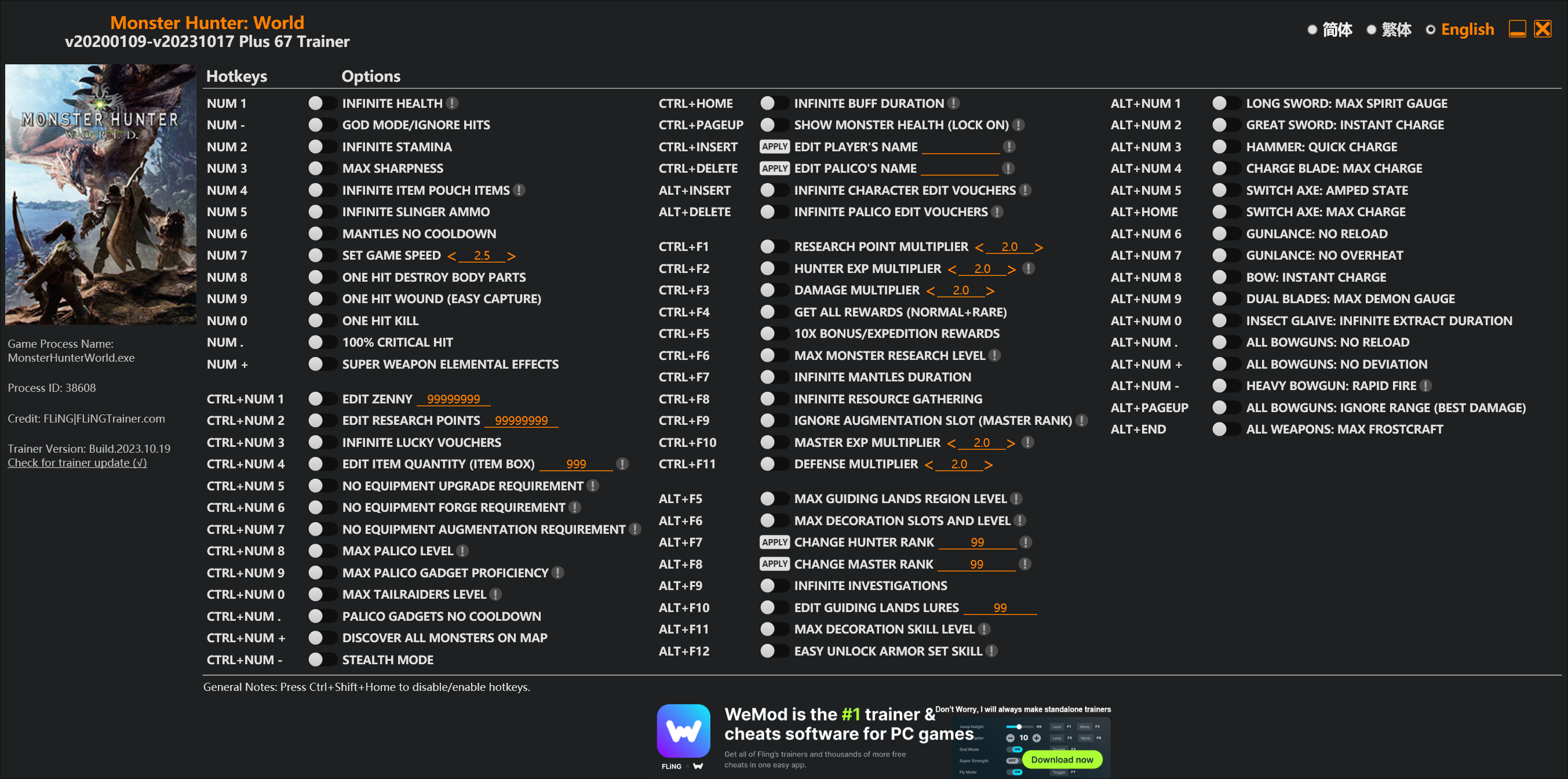
Options
Num 1 – Infinite Health 
Num – – God Mode/Ignore Hits
Num 2 – Infinite Stamina
Num 3 – Max Sharpness
Num 4 – Infinite Item Pouch Items
Num 5 – Infinite Slinger Ammo
Num 6 – Mantles No Cooldown
Num 7 – Set Game Speed
Num 8 – One Hit Destroy Body Parts
Num 9 – One Hit Wound (Easy Capture)
Num 0 – One Hit Kill
Num . – 100% Critical Hit
Num + – Super Weapon Elemental Effects
Ctrl+Num 1 – Edit Zenny
Ctrl+Num 2 – Edit Research Points
Ctrl+Num 3 – Infinite Lucky Vouchers
Ctrl+Num 4 – Edit Item Quantity (Item Box)
Ctrl+Num 5 – No Equipment Upgrade Requirement
Ctrl+Num 6 – No Equipment Forge Requirement
Ctrl+Num 7 – No Equipment Augmentation Requirement
Ctrl+Num 8 – Max Palico Level
Ctrl+Num 9 – Max Palico Gadget Proficiency
Ctrl+Num 0 – Max Tailraiders Level
Ctrl+Num . – Palico Gadgets No Cooldown
Ctrl+Num + – Discover All Monsters On Map
Ctrl+Num – – Stealth Mode
Ctrl+Home – Infinite Buff Duration
Ctrl+PageUp – Show Monster Health (Lock On)
Ctrl+Insert – Edit Player’s Name
Ctrl+Delete – Edit Palico’s Name
Alt+Insert – Infinite Character Edit Vouchers
Alt+Delete – Infinite Palico Edit Vouchers
Ctrl+F1 – Research Point Multiplier
Ctrl+F2 – Hunter Exp Multiplier
Ctrl+F3 – Damage Multiplier
Ctrl+F4 – Get All Rewards (Normal+Rare)
Ctrl+F5 – 10x Bonus/Expedition Rewards
Ctrl+F6 – Max Monster Research Level
Ctrl+F7 – Infinite Mantles Duration
Ctrl+F8 – Infinite Resource Gathering
Ctrl+F9 – Ignore Augmentation Slot (Master Rank)
Ctrl+F10 – Master Exp Multiplier
Ctrl+F11 – Defense Multiplier
Alt+F5 – Max Guiding Lands Region Level
Alt+F6 – Max Decoration Slots And Level
Alt+F7 – Change Hunter Rank
Alt+F8 – Change Master Rank
Alt+F9 – Infinite Investigations
Alt+F10 – Edit Guiding Lands Lures
Alt+F11 – Max Decoration Skill Level
Alt+F12 – Easy Unlock Armor Set Skill
Alt+Num 1 – Long Sword: Max Spirit Gauge
Alt+Num 2 – Great Sword: Instant Charge
Alt+Num 3 – Hammer: Quick Charge
Alt+Num 4 – Charge Blade: Max Charge
Alt+Num 5 – Switch Axe: Amped State
Alt+Home – Switch Axe: Max Charge
Alt+Num 6 – Gunlance: No Reload
Alt+Num 7 – Gunlance: No Overheat
Alt+Num 8 – Bow: Instant Charge
Alt+Num 9 – Dual Blades: Max Demon Gauge
Alt+Num 0 – Insect Glaive: Infinite Extract Duration
Alt+Num . – All Bowguns: No Reload
Alt+Num + – All Bowguns: No Deviation
Alt+Num – – Heavy Bowgun: Rapid Fire
Alt+PageUp – All Bowguns: Ignore Range (Best Damage)
Alt+End – All Weapons: Max Frostcraft
Special Notes
If you installed “Stracker’s Loader” and “Performance Booster and Plugin Extender” or other mods, make sure to update them to the latest version or delete them if you don’t use mods, otherwiese the game may crash during startup.
Download
| File | Date added | File size | Downloads |
|---|---|---|---|
 Monster.Hunter.World.v20200109-v20231017.Plus.67.Trainer-FLiNG
|
2023-10-19 10:55 | 926 KB | 1445271 |
|
Monster.Hunter.World.v20200109-v20210602.Plus.67.Trainer-FLiNG
|
2021-06-04 20:24 | 1.33 MB | 497462 |
|
Monster.Hunter.World.v20200109-v20201001.Plus.67.Trainer-FLiNG
|
2020-10-02 08:25 | 1.95 MB | 652621 |
|
Monster.Hunter.World.v20200109-v20201001.Plus.14.Trainer-FLiNG
|
2020-10-01 16:39 | 1.04 MB | 182924 |















added them to game folder game crashes
Give him time so he can unify everything like before. Besides, there’s an update on the 8th & 15th. They might update the security protocols again.
I think you’re just pointing out the Event Quest rotation. With the new Halloween Event unlocking on the 15th/16th depending on your rime zone. But the files are already in-game. AFAIK, there are no scheduled updates
闪退了 怎么肥四0.0
I tried to follow note but the game still crashes. I gave up, I will wait for your new update. Please don’t rush
If I put plugins and files in the same way, the game won’t turn on. If you can’t delete the plugin one day, but you can’t delete it, you want to give up, but it’s still too early. Don’t rush.
you’re the best
Will the mods create a problem with online play? I’m asking specifically about the Stacker Loader and Performance Booster mod
두개 파일 받아서 3개파일짜리는 몬헌 폴더에 EXE이는곳에 풀고 네이티브pc 그대로 EXE이는 데 폴더채로 넣으면 실행됩니다.
According to his instructions:
1. Extract Stracker’s Loader zip and put the 3 extracted files in the Monster Hunter World folder, where the .exe for launching the game is located.
2. There would be a folder named “nativePC” in the same location, put the extracted Performance Booster file under nativePC\plugins, and then launch the game and the trainer.
I’ve failed for 1 hour until I found above comment and now it works. For your reference.
I love you, bro
I love YOu You helped me out I really love you bro
just install stracker and performance booster with vortex using nexus mods
then extract the trainer to ur desktop and run it
or just git gud
if u crash while running cheats when you for instance go into ur item box or whenever the game checks ur data then cheating just isnt going to be possible for awhile until thats fixed cuz the same thing is happening with cheatengine.
For everyone who are still confused and crashing try this, it works for me
https://www.youtube.com/watch?v=Ozfmk9NKUaU
Note : back up your save file first before modding (just in case corrupted)
bro thanks
这么快就有67项了?!风灵月影,永远嘀神
风大,还是没学会,那两个.dll后缀的文件怎么使用,.json的怎么调试
Thanks once again for the work, works fine. I just followed the instructions. Got Stracker, the bypass and boop there it is.
CANT USE IT, EVEN I PUT ALL THE REQUIRED DOCUMENTS. IT WILL CRUSH WHEN I RUN THE MHWI, AND THE TRAINER WILL ALSO POP-UP THE ERROR WINDOW.
放入了所有MOD FILE都还是用不到,单独运行游戏会到加载面崩溃,打开修改器会跳框。