
Note: Offline mode only.
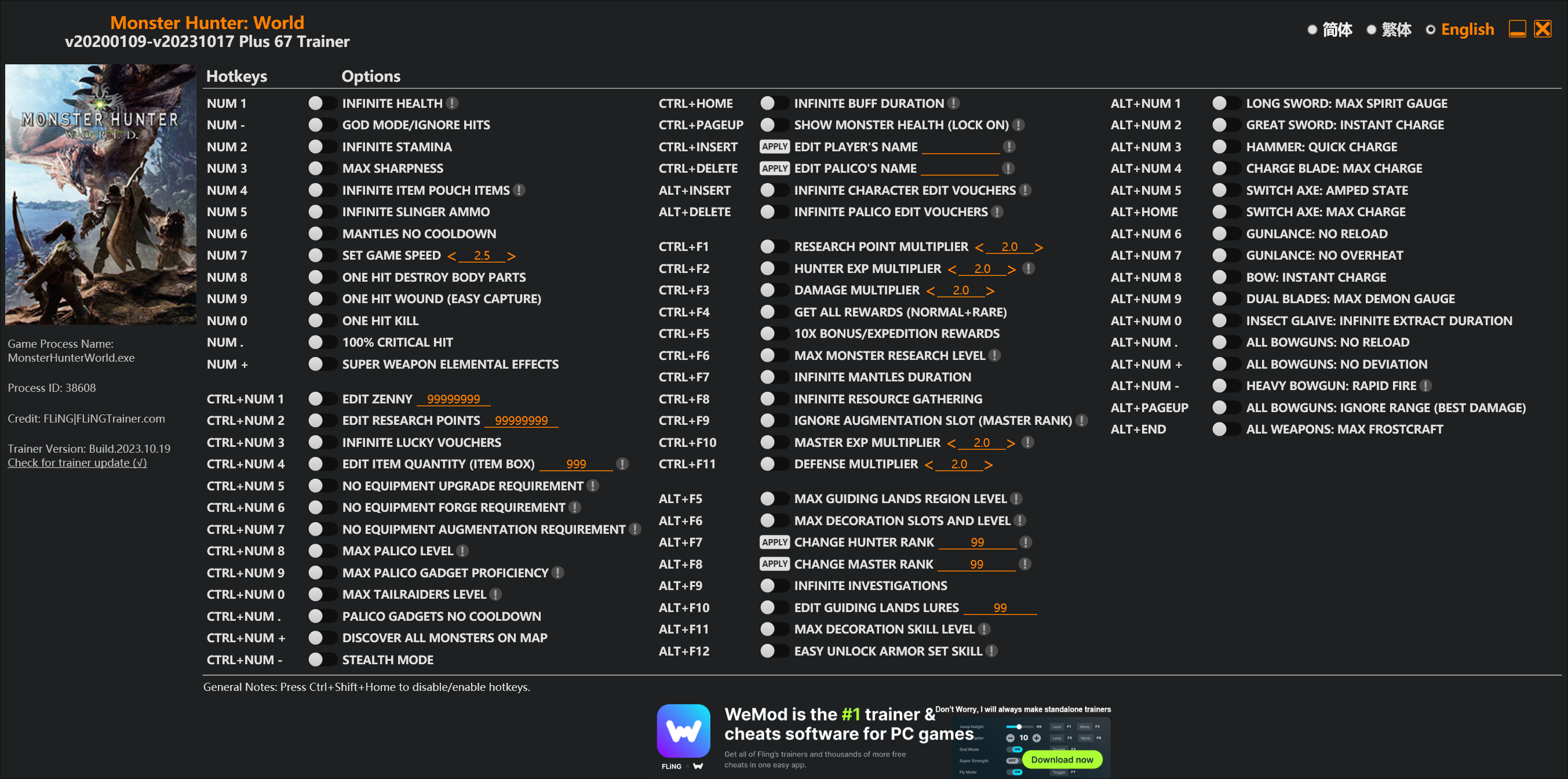
Options
Num 1 – Infinite Health 
Num – – God Mode/Ignore Hits
Num 2 – Infinite Stamina
Num 3 – Max Sharpness
Num 4 – Infinite Item Pouch Items
Num 5 – Infinite Slinger Ammo
Num 6 – Mantles No Cooldown
Num 7 – Set Game Speed
Num 8 – One Hit Destroy Body Parts
Num 9 – One Hit Wound (Easy Capture)
Num 0 – One Hit Kill
Num . – 100% Critical Hit
Num + – Super Weapon Elemental Effects
Ctrl+Num 1 – Edit Zenny
Ctrl+Num 2 – Edit Research Points
Ctrl+Num 3 – Infinite Lucky Vouchers
Ctrl+Num 4 – Edit Item Quantity (Item Box)
Ctrl+Num 5 – No Equipment Upgrade Requirement
Ctrl+Num 6 – No Equipment Forge Requirement
Ctrl+Num 7 – No Equipment Augmentation Requirement
Ctrl+Num 8 – Max Palico Level
Ctrl+Num 9 – Max Palico Gadget Proficiency
Ctrl+Num 0 – Max Tailraiders Level
Ctrl+Num . – Palico Gadgets No Cooldown
Ctrl+Num + – Discover All Monsters On Map
Ctrl+Num – – Stealth Mode
Ctrl+Home – Infinite Buff Duration
Ctrl+PageUp – Show Monster Health (Lock On)
Ctrl+Insert – Edit Player’s Name
Ctrl+Delete – Edit Palico’s Name
Alt+Insert – Infinite Character Edit Vouchers
Alt+Delete – Infinite Palico Edit Vouchers
Ctrl+F1 – Research Point Multiplier
Ctrl+F2 – Hunter Exp Multiplier
Ctrl+F3 – Damage Multiplier
Ctrl+F4 – Get All Rewards (Normal+Rare)
Ctrl+F5 – 10x Bonus/Expedition Rewards
Ctrl+F6 – Max Monster Research Level
Ctrl+F7 – Infinite Mantles Duration
Ctrl+F8 – Infinite Resource Gathering
Ctrl+F9 – Ignore Augmentation Slot (Master Rank)
Ctrl+F10 – Master Exp Multiplier
Ctrl+F11 – Defense Multiplier
Alt+F5 – Max Guiding Lands Region Level
Alt+F6 – Max Decoration Slots And Level
Alt+F7 – Change Hunter Rank
Alt+F8 – Change Master Rank
Alt+F9 – Infinite Investigations
Alt+F10 – Edit Guiding Lands Lures
Alt+F11 – Max Decoration Skill Level
Alt+F12 – Easy Unlock Armor Set Skill
Alt+Num 1 – Long Sword: Max Spirit Gauge
Alt+Num 2 – Great Sword: Instant Charge
Alt+Num 3 – Hammer: Quick Charge
Alt+Num 4 – Charge Blade: Max Charge
Alt+Num 5 – Switch Axe: Amped State
Alt+Home – Switch Axe: Max Charge
Alt+Num 6 – Gunlance: No Reload
Alt+Num 7 – Gunlance: No Overheat
Alt+Num 8 – Bow: Instant Charge
Alt+Num 9 – Dual Blades: Max Demon Gauge
Alt+Num 0 – Insect Glaive: Infinite Extract Duration
Alt+Num . – All Bowguns: No Reload
Alt+Num + – All Bowguns: No Deviation
Alt+Num – – Heavy Bowgun: Rapid Fire
Alt+PageUp – All Bowguns: Ignore Range (Best Damage)
Alt+End – All Weapons: Max Frostcraft
Special Notes
If you installed “Stracker’s Loader” and “Performance Booster and Plugin Extender” or other mods, make sure to update them to the latest version or delete them if you don’t use mods, otherwiese the game may crash during startup.
Download
| File | Date added | File size | Downloads |
|---|---|---|---|
 Monster.Hunter.World.v20200109-v20231017.Plus.67.Trainer-FLiNG
|
2023-10-19 10:55 | 926 KB | 1444724 |
|
Monster.Hunter.World.v20200109-v20210602.Plus.67.Trainer-FLiNG
|
2021-06-04 20:24 | 1.33 MB | 497440 |
|
Monster.Hunter.World.v20200109-v20201001.Plus.67.Trainer-FLiNG
|
2020-10-02 08:25 | 1.95 MB | 652614 |
|
Monster.Hunter.World.v20200109-v20201001.Plus.14.Trainer-FLiNG
|
2020-10-01 16:39 | 1.04 MB | 182921 |
















in order to make the trainer work first theres a file that says read me in there you will find 2 links download the mods and then go to steam library where mhw is then just move the file there
note : the file name native pc must be pulled entirely to the mhw folder
or just watch a tutorial on youtube about the 2 mods
Got Detected incorrect value in save data after useing the trainer and relogging, pretty sure i didnt get any unrelease content, never had this problem with your trainers before. went offline to look for unreleased items but couldnt find any.
same here…..weird…i sell every item but nothing…
Fling is the best trainer out there.. I love u whoever u r
I’m a Korean
I am writing a translator
I don’t know how to proceed.. Can you explain in detail?
the new slacker does not work, i installed the one dated april, drag every thing in the root. Right click game in steam, go prop. then local file. Then the pro booster, the fatalis patch, i dragged the native pc folder in to the root, and i also copy and paste the plugin folder in root. It works. The old slacker say its fails but what ever.
I have followed every step as you told. But the program is still not available. Please help us.
It works perfectly for me. Thank You!!!!
with mod or not?
You will need mod for this trainer to work. There is no other way. The trainer need to bypass crc anti-tamper, otherwise it will not work.
有看海是不太會
不知道为什么不让我下载最后两步的MOD
我的VC_redist.x64安裝失敗,他給我的記錄是這樣的,可以幫我看看為什麼安裝失敗嗎?
[3144:3724][2020-10-03T02:06:29]i001: Burn v3.10.4.4718, Windows v6.2 (Build 9200: Service Pack 0), path: C:\Users\OMEN\AppData\Local\Temp\{4D31016E-CA87-42D3-A1C0-EE41D3404ADC}\.cr\VC_redist.x64.exe
[3144:3724][2020-10-03T02:06:29]i009: Command Line: ‘-burn.clean.room=C:\Users\OMEN\Desktop\VC_redist.x64.exe -burn.filehandle.attached=788 -burn.filehandle.self=784’
[3144:3724][2020-10-03T02:06:29]i000: Setting string variable ‘WixBundleOriginalSource’ to value ‘C:\Users\OMEN\Desktop\VC_redist.x64.exe’
[3144:3724][2020-10-03T02:06:29]i000: Setting string variable ‘WixBundleOriginalSourceFolder’ to value ‘C:\Users\OMEN\Desktop\’
[3144:3724][2020-10-03T02:06:29]i000: Setting string variable ‘WixBundleLog’ to value ‘C:\Users\OMEN\AppData\Local\Temp\dd_vcredist_amd64_20201003020629.log’
[3144:3724][2020-10-03T02:06:29]i000: Setting string variable ‘WixBundleManufacturer’ to value ‘Microsoft Corporation’
[3144:2FD0][2020-10-03T02:06:30]i000: Setting version variable ‘WixBundleFileVersion’ to value ‘14.27.29112.0’
[3144:3724][2020-10-03T02:06:30]i100: Detect begin, 10 packages
[3144:3724][2020-10-03T02:06:30]i000: Setting version variable ‘windows_uCRT_DetectKey’ to value ‘10.0.18362.815’
[3144:3724][2020-10-03T02:06:30]i000: Setting numeric variable ‘windows_uCRT_DetectKeyExists’ to value 1
[3144:3724][2020-10-03T02:06:30]i052: Condition ‘(VersionNT = v6.3 AND NOT VersionNT64) AND (windows_uCRT_DetectKeyExists AND windows_uCRT_DetectKey >= v10.0.10240.0)’ evaluates to false.
[3144:3724][2020-10-03T02:06:30]i052: Condition ‘(VersionNT = v6.3 AND VersionNT64) AND (windows_uCRT_DetectKeyExists AND windows_uCRT_DetectKey >= v10.0.10240.0)’ evaluates to false.
[3144:3724][2020-10-03T02:06:30]i052: Condition ‘(VersionNT = v6.2 AND NOT VersionNT64) AND (windows_uCRT_DetectKeyExists AND windows_uCRT_DetectKey >= v10.0.10240.0)’ evaluates to false.
[3144:3724][2020-10-03T02:06:30]i052: Condition ‘(VersionNT = v6.2 AND VersionNT64) AND (windows_uCRT_DetectKeyExists AND windows_uCRT_DetectKey >= v10.0.10240.0)’ evaluates to true.
[3144:3724][2020-10-03T02:06:30]i052: Condition ‘(VersionNT = v6.1 AND NOT VersionNT64) AND (windows_uCRT_DetectKeyExists AND windows_uCRT_DetectKey >= v10.0.10240.0)’ evaluates to false.
[3144:3724][2020-10-03T02:06:30]i052: Condition ‘(VersionNT = v6.1 AND VersionNT64) AND (windows_uCRT_DetectKeyExists AND windows_uCRT_DetectKey >= v10.0.10240.0)’ evaluates to false.
[3144:3724][2020-10-03T02:06:30]i052: Condition ‘(VersionNT = v6.0 AND NOT VersionNT64) AND (windows_uCRT_DetectKeyExists AND windows_uCRT_DetectKey >= v10.0.10240.0)’ evaluates to false.
[3144:3724][2020-10-03T02:06:30]i052: Condition ‘(VersionNT = v6.0 AND VersionNT64) AND (windows_uCRT_DetectKeyExists AND windows_uCRT_DetectKey >= v10.0.10240.0)’ evaluates to false.
[3144:3724][2020-10-03T02:06:30]i101: Detected package: Windows81_x86, state: Absent, cached: None
[3144:3724][2020-10-03T02:06:30]i101: Detected package: Windows81_x64, state: Absent, cached: None
[3144:3724][2020-10-03T02:06:30]i101: Detected package: Windows8_x86, state: Absent, cached: None
[3144:3724][2020-10-03T02:06:30]i101: Detected package: Windows8_x64, state: Present, cached: None
[3144:3724][2020-10-03T02:06:30]i101: Detected package: Windows7_MSU_x86, state: Absent, cached: None
[3144:3724][2020-10-03T02:06:30]i101: Detected package: Windows7_MSU_x64, state: Absent, cached: None
[3144:3724][2020-10-03T02:06:30]i101: Detected package: WindowsVista_MSU_x86, state: Absent, cached: None
[3144:3724][2020-10-03T02:06:30]i101: Detected package: WindowsVista_MSU_x64, state: Absent, cached: None
[3144:3724][2020-10-03T02:06:30]i101: Detected package: vcRuntimeMinimum_x64, state: Present, cached: Complete
[3144:3724][2020-10-03T02:06:30]i101: Detected package: vcRuntimeAdditional_x64, state: Present, cached: Complete
[3144:3724][2020-10-03T02:06:30]i052: Condition ‘VersionNT64 >= v6.0 OR (VersionNT64 = v5.2 AND ServicePackLevel >= 1)’ evaluates to true.
[3144:3724][2020-10-03T02:06:30]i199: Detect complete, result: 0x0
[3144:3724][2020-10-03T02:06:31]i200: Plan begin, 10 packages, action: Repair
[3144:3724][2020-10-03T02:06:31]i052: Condition ‘VersionNT = v6.3 AND NOT VersionNT64’ evaluates to false.
[3144:3724][2020-10-03T02:06:31]w321: Skipping dependency registration on package with no dependency providers: Windows81_x86
[3144:3724][2020-10-03T02:06:31]i052: Condition ‘VersionNT = v6.3 AND VersionNT64’ evaluates to false.
[3144:3724][2020-10-03T02:06:31]w321: Skipping dependency registration on package with no dependency providers: Windows81_x64
[3144:3724][2020-10-03T02:06:31]i052: Condition ‘VersionNT = v6.2 AND NOT VersionNT64’ evaluates to false.
[3144:3724][2020-10-03T02:06:31]w321: Skipping dependency registration on package with no dependency providers: Windows8_x86
[3144:3724][2020-10-03T02:06:31]i052: Condition ‘VersionNT = v6.2 AND VersionNT64’ evaluates to true.
[3144:3724][2020-10-03T02:06:31]w321: Skipping dependency registration on package with no dependency providers: Windows8_x64
[3144:3724][2020-10-03T02:06:31]i052: Condition ‘VersionNT = v6.1 AND NOT VersionNT64’ evaluates to false.
[3144:3724][2020-10-03T02:06:31]w321: Skipping dependency registration on package with no dependency providers: Windows7_MSU_x86
[3144:3724][2020-10-03T02:06:31]i052: Condition ‘VersionNT = v6.1 AND VersionNT64’ evaluates to false.
[3144:3724][2020-10-03T02:06:31]w321: Skipping dependency registration on package with no dependency providers: Windows7_MSU_x64
[3144:3724][2020-10-03T02:06:31]i052: Condition ‘VersionNT = v6.0 AND NOT VersionNT64’ evaluates to false.
[3144:3724][2020-10-03T02:06:31]w321: Skipping dependency registration on package with no dependency providers: WindowsVista_MSU_x86
[3144:3724][2020-10-03T02:06:31]i052: Condition ‘VersionNT = v6.0 AND VersionNT64’ evaluates to false.
[3144:3724][2020-10-03T02:06:31]w321: Skipping dependency registration on package with no dependency providers: WindowsVista_MSU_x64
[3144:3724][2020-10-03T02:06:31]i052: Condition ‘(VersionNT64)’ evaluates to true.
[3144:3724][2020-10-03T02:06:31]i000: Setting string variable ‘WixBundleLog_vcRuntimeMinimum_x64’ to value ‘C:\Users\OMEN\AppData\Local\Temp\dd_vcredist_amd64_20201003020629_000_vcRuntimeMinimum_x64.log’
[3144:3724][2020-10-03T02:06:31]i052: Condition ‘(VersionNT64)’ evaluates to true.
[3144:3724][2020-10-03T02:06:31]i000: Setting string variable ‘WixBundleLog_vcRuntimeAdditional_x64’ to value ‘C:\Users\OMEN\AppData\Local\Temp\dd_vcredist_amd64_20201003020629_001_vcRuntimeAdditional_x64.log’
[3144:3724][2020-10-03T02:06:31]i201: Planned package: Windows81_x86, state: Absent, default requested: Absent, ba requested: Absent, execute: None, rollback: None, cache: No, uncache: No, dependency: None
[3144:3724][2020-10-03T02:06:31]i201: Planned package: Windows81_x64, state: Absent, default requested: Absent, ba requested: Absent, execute: None, rollback: None, cache: No, uncache: No, dependency: None
[3144:3724][2020-10-03T02:06:31]i201: Planned package: Windows8_x86, state: Absent, default requested: Absent, ba requested: Absent, execute: None, rollback: None, cache: No, uncache: No, dependency: None
[3144:3724][2020-10-03T02:06:31]i201: Planned package: Windows8_x64, state: Present, default requested: Repair, ba requested: Repair, execute: None, rollback: None, cache: No, uncache: No, dependency: None
[3144:3724][2020-10-03T02:06:31]i201: Planned package: Windows7_MSU_x86, state: Absent, default requested: Absent, ba requested: Absent, execute: None, rollback: None, cache: No, uncache: No, dependency: None
[3144:3724][2020-10-03T02:06:31]i201: Planned package: Windows7_MSU_x64, state: Absent, default requested: Absent, ba requested: Absent, execute: None, rollback: None, cache: No, uncache: No, dependency: None
[3144:3724][2020-10-03T02:06:31]i201: Planned package: WindowsVista_MSU_x86, state: Absent, default requested: Absent, ba requested: Absent, execute: None, rollback: None, cache: No, uncache: No, dependency: None
[3144:3724][2020-10-03T02:06:31]i201: Planned package: WindowsVista_MSU_x64, state: Absent, default requested: Absent, ba requested: Absent, execute: None, rollback: None, cache: No, uncache: No, dependency: None
[3144:3724][2020-10-03T02:06:31]i201: Planned package: vcRuntimeMinimum_x64, state: Present, default requested: Repair, ba requested: Repair, execute: Repair, rollback: None, cache: No, uncache: No, dependency: Register
[3144:3724][2020-10-03T02:06:31]i201: Planned package: vcRuntimeAdditional_x64, state: Present, default requested: Repair, ba requested: Repair, execute: Repair, rollback: None, cache: No, uncache: No, dependency: Register
[3144:3724][2020-10-03T02:06:31]i299: Plan complete, result: 0x0
[3144:3724][2020-10-03T02:06:31]i300: Apply begin
[3144:3724][2020-10-03T02:06:32]i399: Apply complete, result: 0x8007015e, restart: Required, ba requested restart: No
1.把压缩包”Stracker’s Loader“里的文件(非文件夹)放至怪物猎人世界根目录
2.再将压缩包“Fatalis Patc”内的nativePC文件夹放至怪物猎人世界根目录(如nativePC文件夹已存在,则合并两个nativePC文件夹的内容)
只能帮到这儿了好兄弟们!
祝讨伐黑龙顺利,修雷德王国所经历的灾难决不能重现!
我按照步骤操作后,也下载了新的Visual C++:
Visual Studio 2015、2017 和 2019
下载适用于 Visual Studio 2015、2017 和 2019 的 Microsoft Visual C++ 可再发行软件包。 以下更新是适用于 Visual Studio 2015、2017 和 2019 的最新支持的 Visual C++ 可再发行软件包。 包括的是通用 C Runtime 的基准版本,请参阅 MSDN 了解详细信息。
x86: vc_redist.x86.exe
x64: vc_redist.x64.exe
ARM64: vc_redist.arm64.exe
但是打开游戏后会有闪退,进不了游戏
可以加个q或V吗,实在是不太会
兄弟我放进去然后运行不了说不能运行
兄弟我放进去然后运行不了说不能运行
I have read through the comments a couple of times and could not understand exactly what to do, I have 3 files from one zipped file, and a folder called NativePC from another zipped file.
I copy the 3 files into NativePC and put the whole folder in my monster hunter world steam folder. and when I did this and opened the MOD it still tells me that I must open the game. I am unable to turn on any MOD.
is anybody willing to go through the steps briefly but clearly to help out? Thanks
also thanks FLING for your work. very much appreciated
1.【dtdata.dll】、【loader.dll】、【loader-config.json】 → Folder【Steam\steamapps\common\Monster Hunter World】
2.Folder【plugins】 → Folder【Steam\steamapps\common\Monster Hunter World\nativePC】
只能帮到这了,兄弟
兄弟我一直在闪退有什么办法吗,一进游戏plugins就显示加载失败
Thank you bro, good explanation.
【dtdata.dll】、【loader.dll】、【loader-config.json】 → Folder【Steam\steamapps\common\Monster Hunter World】 – Already pasted in Monster Hunter World
Folder【plugins】 → Folder【Steam\steamapps\common\Monster Hunter World\nativePC】- Plugins folder is available inside NativePC folder. should I remove it and and paste it alone in Monster Hunder world folder?
Thank you again
For all the people who can’t get the mods to work, try installing through Vortex mod loader. Worked perfectly for me
can you help me, ive extract the files from the two folder to the root folder of mhw iceborn in steamapps, but it still doesnt work, anybody can help?
밀라보레아스 잡을려고 썼다가 무슨”저장 데이터에 올바르지 않은 데이터 값이 검색되었습니다”라고 뜨네요. 인터넷에 검색해보니 미출시된 더미 아이템을 삭제하라는데.. 10.5 업데이트 기준으로 미출시된 더미데이터가 뭔지 원…
10.15까지 기다리면 풀림 엌ㅋㅋㅋㅋ
지가 아직 나오지도 않은거 트레이너로 만져놓고 누굴 탓하고있음 ㅋ