
Note: Offline mode only.
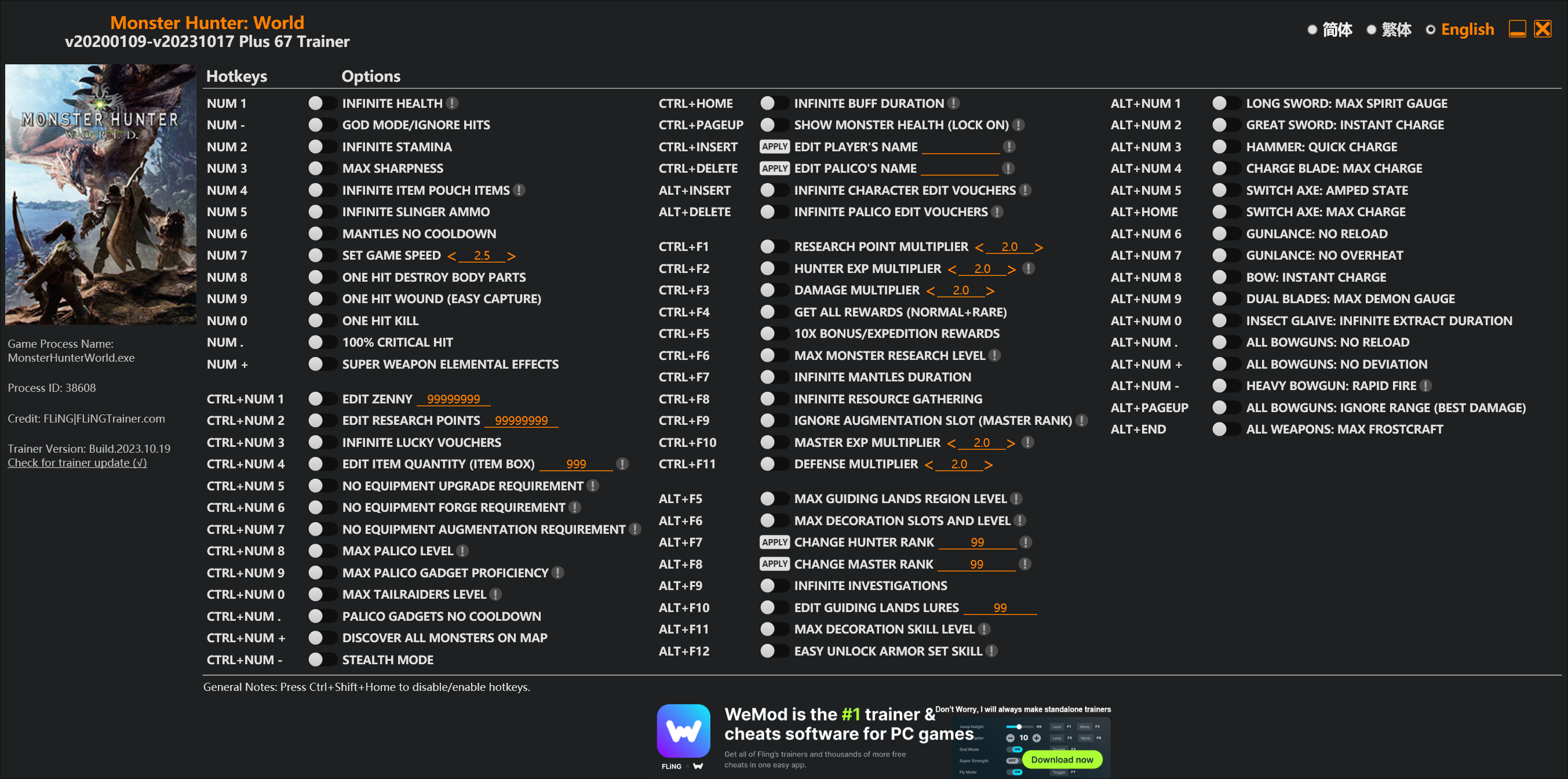
Options
Num 1 – Infinite Health 
Num – – God Mode/Ignore Hits
Num 2 – Infinite Stamina
Num 3 – Max Sharpness
Num 4 – Infinite Item Pouch Items
Num 5 – Infinite Slinger Ammo
Num 6 – Mantles No Cooldown
Num 7 – Set Game Speed
Num 8 – One Hit Destroy Body Parts
Num 9 – One Hit Wound (Easy Capture)
Num 0 – One Hit Kill
Num . – 100% Critical Hit
Num + – Super Weapon Elemental Effects
Ctrl+Num 1 – Edit Zenny
Ctrl+Num 2 – Edit Research Points
Ctrl+Num 3 – Infinite Lucky Vouchers
Ctrl+Num 4 – Edit Item Quantity (Item Box)
Ctrl+Num 5 – No Equipment Upgrade Requirement
Ctrl+Num 6 – No Equipment Forge Requirement
Ctrl+Num 7 – No Equipment Augmentation Requirement
Ctrl+Num 8 – Max Palico Level
Ctrl+Num 9 – Max Palico Gadget Proficiency
Ctrl+Num 0 – Max Tailraiders Level
Ctrl+Num . – Palico Gadgets No Cooldown
Ctrl+Num + – Discover All Monsters On Map
Ctrl+Num – – Stealth Mode
Ctrl+Home – Infinite Buff Duration
Ctrl+PageUp – Show Monster Health (Lock On)
Ctrl+Insert – Edit Player’s Name
Ctrl+Delete – Edit Palico’s Name
Alt+Insert – Infinite Character Edit Vouchers
Alt+Delete – Infinite Palico Edit Vouchers
Ctrl+F1 – Research Point Multiplier
Ctrl+F2 – Hunter Exp Multiplier
Ctrl+F3 – Damage Multiplier
Ctrl+F4 – Get All Rewards (Normal+Rare)
Ctrl+F5 – 10x Bonus/Expedition Rewards
Ctrl+F6 – Max Monster Research Level
Ctrl+F7 – Infinite Mantles Duration
Ctrl+F8 – Infinite Resource Gathering
Ctrl+F9 – Ignore Augmentation Slot (Master Rank)
Ctrl+F10 – Master Exp Multiplier
Ctrl+F11 – Defense Multiplier
Alt+F5 – Max Guiding Lands Region Level
Alt+F6 – Max Decoration Slots And Level
Alt+F7 – Change Hunter Rank
Alt+F8 – Change Master Rank
Alt+F9 – Infinite Investigations
Alt+F10 – Edit Guiding Lands Lures
Alt+F11 – Max Decoration Skill Level
Alt+F12 – Easy Unlock Armor Set Skill
Alt+Num 1 – Long Sword: Max Spirit Gauge
Alt+Num 2 – Great Sword: Instant Charge
Alt+Num 3 – Hammer: Quick Charge
Alt+Num 4 – Charge Blade: Max Charge
Alt+Num 5 – Switch Axe: Amped State
Alt+Home – Switch Axe: Max Charge
Alt+Num 6 – Gunlance: No Reload
Alt+Num 7 – Gunlance: No Overheat
Alt+Num 8 – Bow: Instant Charge
Alt+Num 9 – Dual Blades: Max Demon Gauge
Alt+Num 0 – Insect Glaive: Infinite Extract Duration
Alt+Num . – All Bowguns: No Reload
Alt+Num + – All Bowguns: No Deviation
Alt+Num – – Heavy Bowgun: Rapid Fire
Alt+PageUp – All Bowguns: Ignore Range (Best Damage)
Alt+End – All Weapons: Max Frostcraft
Special Notes
If you installed “Stracker’s Loader” and “Performance Booster and Plugin Extender” or other mods, make sure to update them to the latest version or delete them if you don’t use mods, otherwiese the game may crash during startup.
Download
| File | Date added | File size | Downloads |
|---|---|---|---|
 Monster.Hunter.World.v20200109-v20231017.Plus.67.Trainer-FLiNG
|
2023-10-19 10:55 | 926 KB | 1441401 |
|
Monster.Hunter.World.v20200109-v20210602.Plus.67.Trainer-FLiNG
|
2021-06-04 20:24 | 1.33 MB | 497360 |
|
Monster.Hunter.World.v20200109-v20201001.Plus.67.Trainer-FLiNG
|
2020-10-02 08:25 | 1.95 MB | 652558 |
|
Monster.Hunter.World.v20200109-v20201001.Plus.14.Trainer-FLiNG
|
2020-10-01 16:39 | 1.04 MB | 182894 |













百度网盘 https://pan.baidu.com/s/1eCxjgDF7JogpP2W3IP2e2Q 提取码:6nbc
可以
Mine required an updated today and then said file corruption and deleted itself. After re-installing the 67 i keep trying to extract and when i do it deletes itself again. Please help
Do you check your window security or anti-virus software or something the same? If you see it turn on, you should turn it off.
same here.. after turn off anti-virus software also deletes itself
same for me..
14项的用着没什么问题,67的一使用就崩溃,MOD什么的我都装了
Visual C++ 装了没
为什么我的14一用就崩溃直接被删除了,是什么原因
checked all my stuff it is only happening with the 67 and every time i open the 14 it keeps saying there is an update
guess 67 mod needs an update
Can you please update the 67 mod? It’s not working anymore, even with the updated Stracker’s Loader and the Performance Booster and Plugin Extender.
67 trainer needs an update. Stracker’s Mod was updated to 2.0.0, and the trainer isn’t recognizing it.
it works fine for me
It keeps giving me the error that it needs Stracker’s and the other mod when they’re both installed, and updated. So…I dunno what’s wrong with it.
Try installing the stracker’s mod and performance mod manually in your game-folder.
Then move your trainer into the same folder, where the game-exe is. it should work then.
Vortex is often installing the mods in the wrong folders. So best do it manually.
You Sir a Hero.
mine isnt working
the 67 one keeps getting deleted by antivirus. first time this has happened since mhw has been released. says its a trojan editing registry files.
this may be happening, if you are not using the CRC bypass-mod.
You need the Stracker’s Mod loader mod and the performance-booster mod, which contains the CRC bypass.
if it’s still happening to be deleted, whitelist the trainer. worked for me.
how to whitelist it ?
error message hlep me
I don’t understand how to use 67plus.
can i use it with the paradox pirate version
Hi Fling,
Is there by any chance that you can create a trainer without Stracker’s Loader & Performance Booster and Plugin Extender from nexus mod ???
He can’t sadly, something about memory and prefixes
So what changed?
They buff up things for the last update?
CRC check. Yes, you will need Stracker’s Loader to load trainer now. So stop asking impossible shit.
now still can use?? alot player are pop out error or only install the new starcker loader only make it work??
dont get it how to install the things the trainer says to install
don’t forget to install the two mods, Stracker’s Mod loader and performance Booster-Mod. in the same folder with the MHW.exe
In some cases, you also need to move the trainer into the same folder as the MHW.exe is placed.
It still works for me
I’ve reinstalled both mods via Vortex again, but still can’t get it to work anymore. It did before, so I know it should, but somehow the Performance Booster and Plugin Extender is still giving errors like it isn’t detected anymore….
install/place it manually, vortex sometimes places the file in the wrong directory
will it work in the base game even without stracker’s loader?
The 67 will open but it closes directly after it pls help ive already tried anti-virus
As it has been stated: you need the Stracker’s mod loader-Mod an the performance-booster for the Bypass. only if you have installed both of them into your game-folder, where the .exe file is, it will work