
Note: Offline mode only.
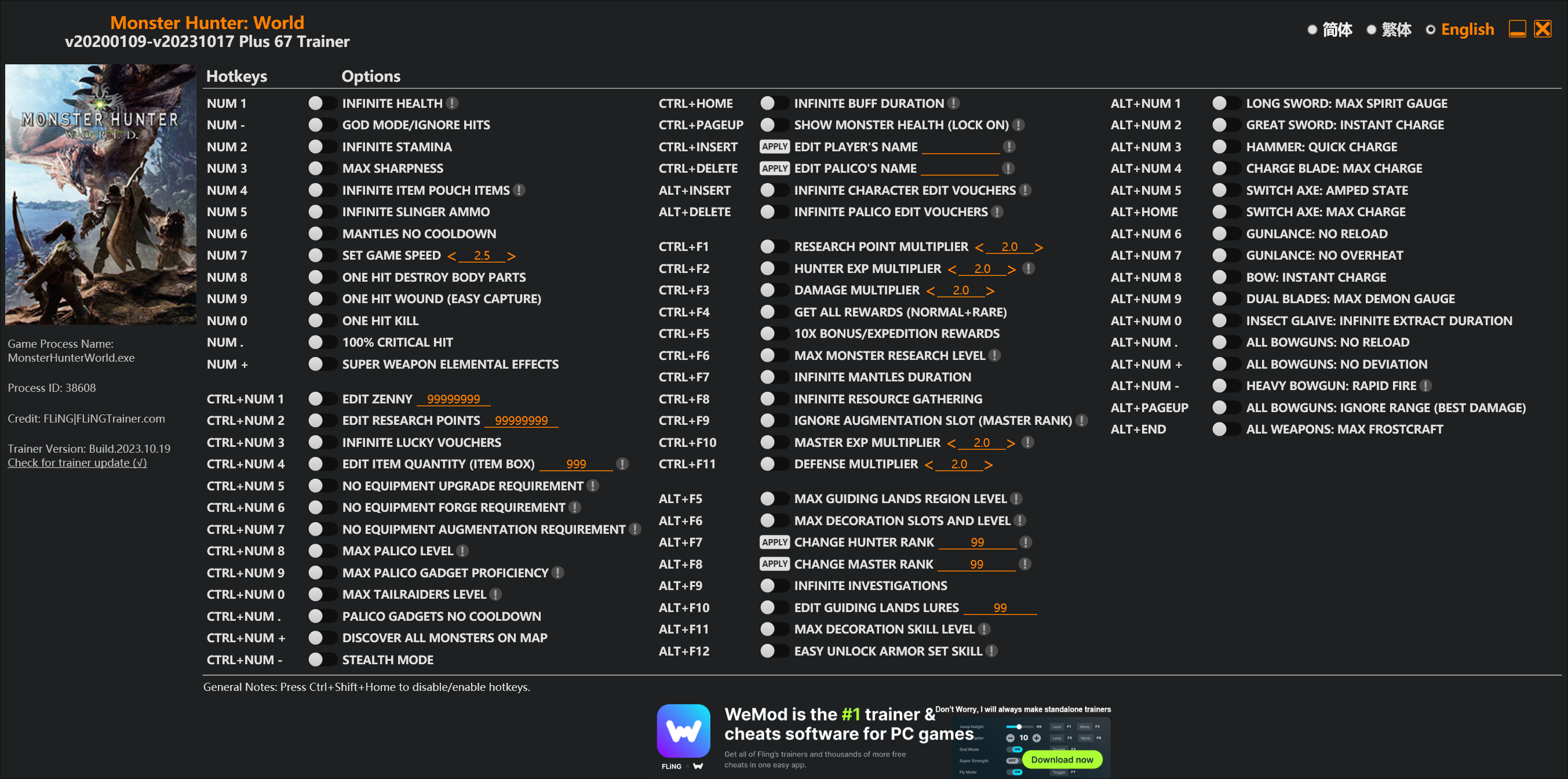
Options
Num 1 – Infinite Health 
Num – – God Mode/Ignore Hits
Num 2 – Infinite Stamina
Num 3 – Max Sharpness
Num 4 – Infinite Item Pouch Items
Num 5 – Infinite Slinger Ammo
Num 6 – Mantles No Cooldown
Num 7 – Set Game Speed
Num 8 – One Hit Destroy Body Parts
Num 9 – One Hit Wound (Easy Capture)
Num 0 – One Hit Kill
Num . – 100% Critical Hit
Num + – Super Weapon Elemental Effects
Ctrl+Num 1 – Edit Zenny
Ctrl+Num 2 – Edit Research Points
Ctrl+Num 3 – Infinite Lucky Vouchers
Ctrl+Num 4 – Edit Item Quantity (Item Box)
Ctrl+Num 5 – No Equipment Upgrade Requirement
Ctrl+Num 6 – No Equipment Forge Requirement
Ctrl+Num 7 – No Equipment Augmentation Requirement
Ctrl+Num 8 – Max Palico Level
Ctrl+Num 9 – Max Palico Gadget Proficiency
Ctrl+Num 0 – Max Tailraiders Level
Ctrl+Num . – Palico Gadgets No Cooldown
Ctrl+Num + – Discover All Monsters On Map
Ctrl+Num – – Stealth Mode
Ctrl+Home – Infinite Buff Duration
Ctrl+PageUp – Show Monster Health (Lock On)
Ctrl+Insert – Edit Player’s Name
Ctrl+Delete – Edit Palico’s Name
Alt+Insert – Infinite Character Edit Vouchers
Alt+Delete – Infinite Palico Edit Vouchers
Ctrl+F1 – Research Point Multiplier
Ctrl+F2 – Hunter Exp Multiplier
Ctrl+F3 – Damage Multiplier
Ctrl+F4 – Get All Rewards (Normal+Rare)
Ctrl+F5 – 10x Bonus/Expedition Rewards
Ctrl+F6 – Max Monster Research Level
Ctrl+F7 – Infinite Mantles Duration
Ctrl+F8 – Infinite Resource Gathering
Ctrl+F9 – Ignore Augmentation Slot (Master Rank)
Ctrl+F10 – Master Exp Multiplier
Ctrl+F11 – Defense Multiplier
Alt+F5 – Max Guiding Lands Region Level
Alt+F6 – Max Decoration Slots And Level
Alt+F7 – Change Hunter Rank
Alt+F8 – Change Master Rank
Alt+F9 – Infinite Investigations
Alt+F10 – Edit Guiding Lands Lures
Alt+F11 – Max Decoration Skill Level
Alt+F12 – Easy Unlock Armor Set Skill
Alt+Num 1 – Long Sword: Max Spirit Gauge
Alt+Num 2 – Great Sword: Instant Charge
Alt+Num 3 – Hammer: Quick Charge
Alt+Num 4 – Charge Blade: Max Charge
Alt+Num 5 – Switch Axe: Amped State
Alt+Home – Switch Axe: Max Charge
Alt+Num 6 – Gunlance: No Reload
Alt+Num 7 – Gunlance: No Overheat
Alt+Num 8 – Bow: Instant Charge
Alt+Num 9 – Dual Blades: Max Demon Gauge
Alt+Num 0 – Insect Glaive: Infinite Extract Duration
Alt+Num . – All Bowguns: No Reload
Alt+Num + – All Bowguns: No Deviation
Alt+Num – – Heavy Bowgun: Rapid Fire
Alt+PageUp – All Bowguns: Ignore Range (Best Damage)
Alt+End – All Weapons: Max Frostcraft
Special Notes
If you installed “Stracker’s Loader” and “Performance Booster and Plugin Extender” or other mods, make sure to update them to the latest version or delete them if you don’t use mods, otherwiese the game may crash during startup.
Download
| File | Date added | File size | Downloads |
|---|---|---|---|
 Monster.Hunter.World.v20200109-v20231017.Plus.67.Trainer-FLiNG
|
2023-10-19 10:55 | 926 KB | 1442409 |
|
Monster.Hunter.World.v20200109-v20210602.Plus.67.Trainer-FLiNG
|
2021-06-04 20:24 | 1.33 MB | 497395 |
|
Monster.Hunter.World.v20200109-v20201001.Plus.67.Trainer-FLiNG
|
2020-10-02 08:25 | 1.95 MB | 652592 |
|
Monster.Hunter.World.v20200109-v20201001.Plus.14.Trainer-FLiNG
|
2020-10-01 16:39 | 1.04 MB | 182904 |
















INFINITE BUFF DURATION does not apply properly.
please check.
现在没有一个功能是可以使用的,球球风大更新一下吧~~
Hello,is anyone here have a cracked copy of the game? when i downloaded the files i just put it in the installation directory cuz there is no application in the said files. i put the 3 files in the directory, Fatalis patch in the native pc folder because both Fatalis and Stracker Loader contain “Native PC” files. the thing is, after ive done the said thing, the game wont work anymore. like even if i click and run the game nothing happen. Can someone with the same problem help me?
how to use the mods ? please update without mods
Auto Crash if i open trainer. there said ” sorry , something went wrong , for solutions. “
用不了,断网情况下进去没开修改器不久后会闪退,要装的东西也装了,但还是会这样。所以这个修改器现在是【废】了的情况。。。。。
装最新的c++或者有可能被防火墙删除了,要恢复
Nothing works, you must update the trainer please.
I can’t get anything to work either. Looks like Capcom finally beat Fling
用不了的兄弟们,请检查自己的两个MOD是否为最新版本。检查是否把MOD装到了对的地方。如果还出现搜索不到游戏进程的话,再多检查并重开几次。我这边是能用的。
when start to use the trainer it said
” Address not found, please try to restart the game and trainer. If this error still occurs, please contact me at Flingtrainer.com or at 3DGAME.
ProcessID: 00004CE4
Search Range: 0000000146000000 – 0000000164785000
Byte Searched: 487.53 MB
Signature: 8B 54 87 14 0F B6 5C 38 54 89 E9 48 FF C1
Trainer Version: Monster Hunter World v20200109-v20200603 Plus 67 Trainer “
下载了最新的MOD还是会闪退
how long wait thing for Iceborne trainer update??
this trainer not working and check in the virus..
please fix in the trainer TT
How long does it take to update the trainer?
更新后,可以使用了。但是我的浏览器很多页面无法打开了,这是为什么?
用不了的兄弟们是你们的C++出问题了,参考上面第三条方案。我昨天更新了C++以后就可以使用了。没在掉线过。
For those saying the trainer does not work with the latest strackers. It does but you may need to install strackers manually with the manual download instead of through Vortex as I found it doesn’t install all the files for me and therefore this trainer cannot find that strackers is installed.
it is Work???